Your Essential Toolkit
Meet your core tools in plain language, then learn the one command that installs almost anything.
The Tools Every Beginner Should Know
Your starter kit, explained simply
You do not need many tools to begin. Here is what each core tool is for.
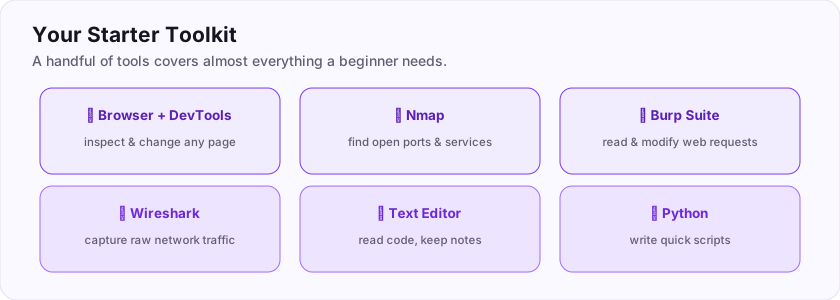
- Your web browser + Developer Tools — press F12 to inspect and even change any web page. Your first and most-used tool.
- Nmap — scans a machine to find its open "doors" (ports) and what is running on them.
- Burp Suite — sits between your browser and a website so you can read and modify the requests being sent.
- Wireshark — captures and shows you the raw network traffic on a connection.
- A text editor (like VS Code) — for reading code and keeping your notes.
- Python — a beginner-friendly language for writing quick scripts.
Which tool would you use to scan a machine for open ports?
+10 ptsNeed a hint?
Four letters, the network mapper.Installing and Checking a Tool
The install command you will use forever
On Kali and other Debian-based Linux, software is installed with a tool called apt. Here is the whole workflow.
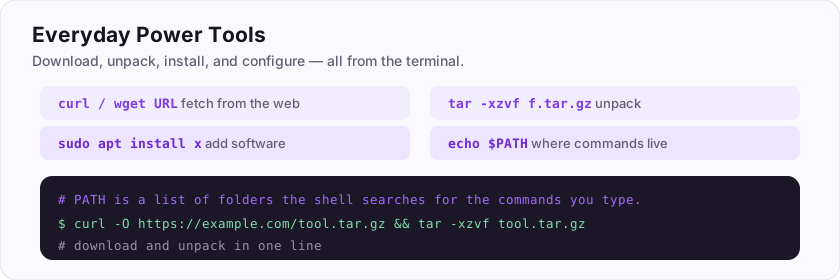
First, check if you already have it
$ nmap --version
Nmap version 7.94
If you see a version number, it is installed. If you see "command not found", install it.
Then install anything you need
$ sudo apt update
$ sudo apt install nmap -y
sudo means "run this as the administrator", apt update refreshes the list of available software, and apt install downloads and installs it. The -y just answers "yes" automatically.
You can now equip yourself with any tool. Reward: ASEC{toolbox_ready}
Which two-word command installs software on Kali/Debian Linux?
+10 ptsNeed a hint?
You run it with sudo in front.What is the flag for this task?
+10 ptsNeed a hint?
It is in bold at the end.Your Web Browser: The First Tool
You already own a hacking tool
Before you install a single thing, your most powerful starting tool is already open: your browser. Every website is delivered *to* it, which means you can read and tinker with everything the site sends you.
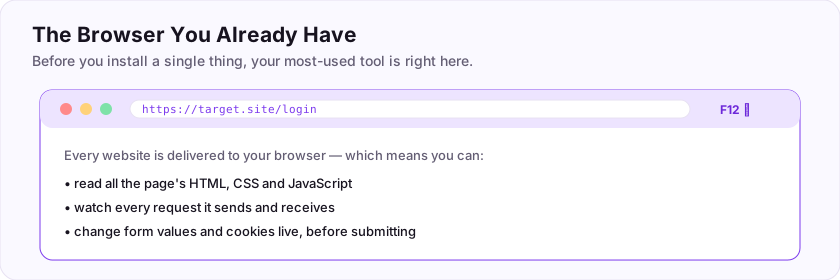
A huge share of real-world security work is web security, and it all happens through the browser. You can view a page's source, watch its network requests, and change form fields before they are submitted — no extra software required. Learning to treat the browser as an instrument, not just a viewer, is the first mindset shift.
Flag: ASEC{the_browser_is_a_weapon}
Before installing anything, your most-used starting tool is already on your computer — what is it? (one word)
+10 ptsNeed a hint?
You are reading this in it.What is the flag for this task?
+10 ptsNeed a hint?
It is in bold at the end.Developer Tools (F12)
The panel hidden in every browser
Press F12 (or right-click a page and choose "Inspect") to open Developer Tools — a built-in control room for the page.
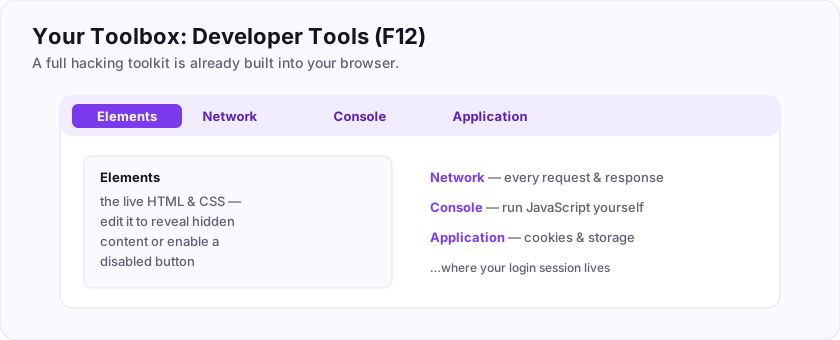
The tabs you will use most:
- Elements — the live HTML/CSS of the page, which you can edit on the spot.
- Console — run JavaScript and read error messages.
- Network — every request the page makes, with the exact data sent and received.
- Application/Storage — cookies and stored data (often where session tokens hide).
The Network and Application tabs are gold for security work: they reveal hidden requests, API calls, and cookies you would never see otherwise.
Flag: ASEC{f12_reveals_all}
Which key opens the browser Developer Tools?
+10 ptsNeed a hint?
A function key at the top of the keyboard.What is the flag for this task?
+10 ptsNeed a hint?
It is in bold at the end.Nmap: Finding Open Doors
Which doors are open?
Every networked machine has thousands of numbered ports — think of them as doors, each potentially leading to a service (a website, a database, remote login). Nmap knocks on them to see which are open.
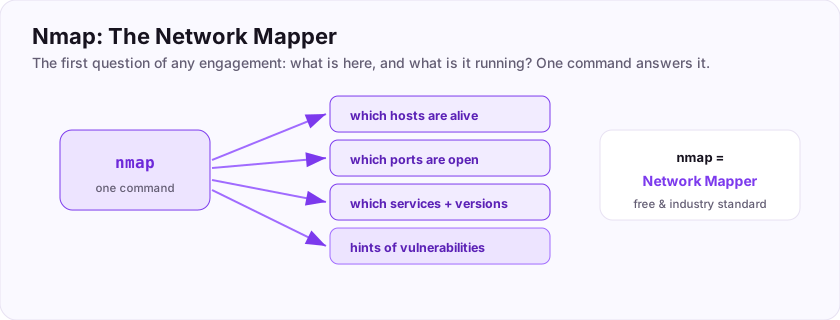
$ nmap 10.0.0.5
PORT     STATE  SERVICE
22/tcp   open   ssh
80/tcp   open   http
443/tcp  open   https
Nmap tells you which ports are open and often *what* is listening on them. This is almost always the first step against any target: you cannot attack a service you do not know exists, so you map the open doors first.
Flag: ASEC{scan_the_doors}
Nmap scans a machine to find its open ___ (the numbered "doors")?
+10 ptsNeed a hint?
Like 22, 80, 443.What is the flag for this task?
+10 ptsNeed a hint?
It is in bold at the end.Burp Suite: The Web Proxy
Read and rewrite web traffic
Burp Suite is the essential web-hacking tool. It works as a proxy: it sits between your browser and the website, so every request passes through Burp where you can pause, read, and change it.
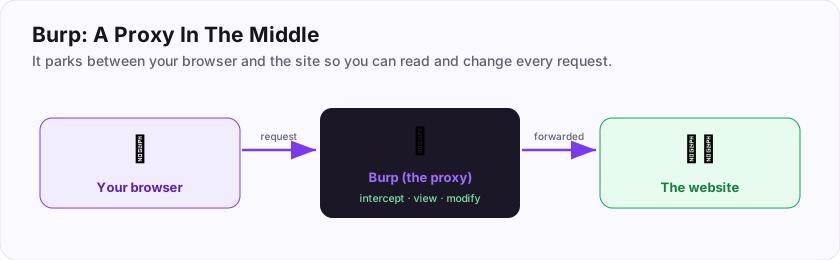
Why that matters: websites often trust data your browser sends (prices, user IDs, hidden fields). With Burp you can intercept a request and alter that data *after* the page's checks but *before* the server sees it — the core move behind countless web attacks. Burp also repeats and automates requests for you.
Flag: ASEC{intercept_the_web}
Burp Suite works as a proxy: it sits between your browser and the ___?
+10 ptsNeed a hint?
The site you are testing (also fine: server).What is the flag for this task?
+10 ptsNeed a hint?
It is in bold at the end.Wireshark: Seeing the Traffic
Look at the raw data on the wire
Where Burp focuses on web requests, Wireshark captures *everything* travelling across a network connection, packet by packet, and shows it to you in detail.
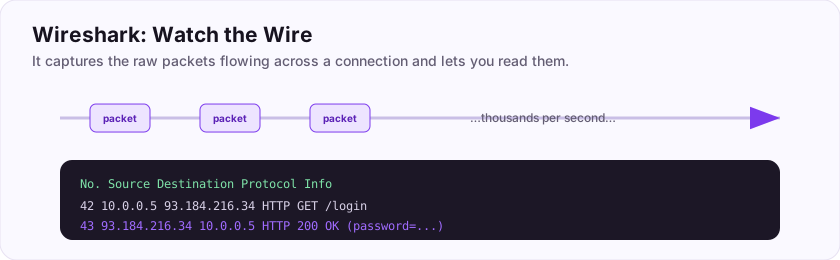
Data on a network moves in small chunks called packets. Wireshark records them and lets you inspect their contents — source, destination, protocol, and, on unencrypted traffic, even the data itself (which is why plain HTTP is dangerous). It is the go-to tool for understanding what is *really* happening on a network.
Flag: ASEC{watch_the_wire}
Wireshark captures network traffic in small chunks called ___?
+10 ptsNeed a hint?
The basic unit of network data.What is the flag for this task?
+10 ptsNeed a hint?
It is in bold at the end.A Text Editor and Note-Taking
The unglamorous tool that makes you good
A text editor (like VS Code, Sublime, or even a simple Markdown app) is where you read code and — just as importantly — keep notes.
Professionals write down *everything* as they work: commands they ran, ports they found, credentials they discovered, ideas to try next. Good notes let you retrace your steps, avoid repeating work, and — crucially — write the report at the end. Taking clear notes as you go is one of the biggest differences between a beginner and a pro.
Flag: ASEC{document_everything}
Writing down every command and finding as you work is called taking ___? (one word)
+10 ptsNeed a hint?
You keep them as you go.What is the flag for this task?
+10 ptsNeed a hint?
It is in bold at the end.Python: Your Scripting Sidekick
Automate the boring parts
Python is the language most security people reach for when a tool does not quite do what they need. It is beginner-friendly and reads almost like English.
$ python3 -c "print('hello from python')"
hello from python
You will use Python to write quick scripts — decode data, hit an API a thousand times, parse a big file, or automate a repetitive attack. You do not need to master it to start; even a ten-line script can save an hour. Many existing security tools are written in Python too, so being able to read it helps you understand and tweak them.
Flag: ASEC{automate_it}
Which beginner-friendly language do security folks most often use for quick scripts?
+10 ptsNeed a hint?
Named after a comedy troupe, not the snake.What is the flag for this task?
+10 ptsNeed a hint?
It is in bold at the end.The Terminal Itself
The hub that ties it all together
Almost every tool here is launched and driven from the terminal. It is the workbench that all your other tools sit on.
nmap, hydra, python3, git, curl — they are all commands you type. The skills from the terminal room (moving around, pipes, redirection) are what let you chain tools together, for example piping Nmap's output into grep, or saving a scan to a file. The stronger your terminal skills, the more powerful every other tool becomes.
Flag: ASEC{terminal_is_home}
Most of these tools are launched from which text-based interface? (one word)
+10 ptsNeed a hint?
Also called the shell or command line.What is the flag for this task?
+10 ptsNeed a hint?
It is in bold at the end.Netcat: The Swiss Army Knife
The tiny tool that does everything
Netcat (the command is nc) is a small program for reading and writing raw network connections — and it is so versatile it is nicknamed the network swiss army knife.
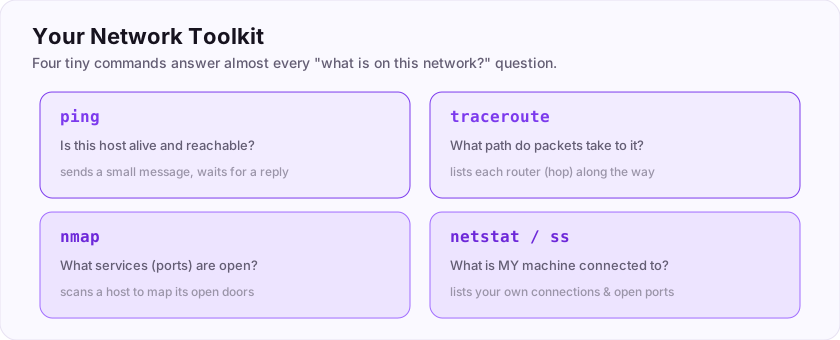
$ nc target.site 80        # connect to a port and talk to it
$ nc -lvnp 4444            # listen for an incoming connection
With nc you can connect to any port to poke at a service, transfer a file, or set up a simple chat — and, famously, catch a reverse shell (an incoming connection from a machine you have exploited). It is the humble tool that appears in a huge number of attacks.
nc) reads and writes raw connections — connect to ports, transfer files, or catch a reverse shell.Flag: ASEC{nc_does_it_all}
Netcat is nicknamed the network Swiss army ___? (one word)
+10 ptsNeed a hint?
A Swiss army...What is the flag for this task?
+10 ptsNeed a hint?
It is in bold at the end.Gobuster & ffuf: Finding Hidden Pages
Discover what is not linked
Websites often have pages and folders that are not linked anywhere — admin panels, backups, old test files. Gobuster and ffuf find them by rapidly guessing names from a list.
$ gobuster dir -u http://target.site -w wordlist.txt
/admin      (Status: 200)
/backup     (Status: 301)
They take a wordlist of common names and try each one against the site, reporting which ones actually exist. This "directory brute-forcing" (or content discovery) uncovers hidden pages and endpoints that are frequently the way in.
Flag: ASEC{find_hidden_paths}
Gobuster and ffuf discover hidden ___ and directories on a website?
+10 ptsNeed a hint?
Things not linked anywhere, like /admin.What is the flag for this task?
+10 ptsNeed a hint?
It is in bold at the end.Nikto: Quick Web Scanner
A fast first look at a web server
Nikto is a simple scanner that checks a web server for thousands of known issues — outdated software, dangerous default files, and common misconfigurations.
$ nikto -h http://target.site
+ Server: Apache/2.2.8 (outdated)
+ /admin/: Admin login page found
Point Nikto at a web server and it quickly flags low-hanging fruit for you to investigate. It is noisy (easy to detect) and not subtle, but as an early, automated sweep it often surfaces useful leads in seconds.
Flag: ASEC{quick_web_scan}
Nikto is a scanner that checks a web ___ for known problems?
+10 ptsNeed a hint?
The machine hosting the site.What is the flag for this task?
+10 ptsNeed a hint?
It is in bold at the end.John & Hashcat: Cracking Passwords
Turning hashes back into passwords
When you obtain password hashes (scrambled, one-way versions of passwords), John the Ripper and hashcat try to recover the original passwords by guessing.
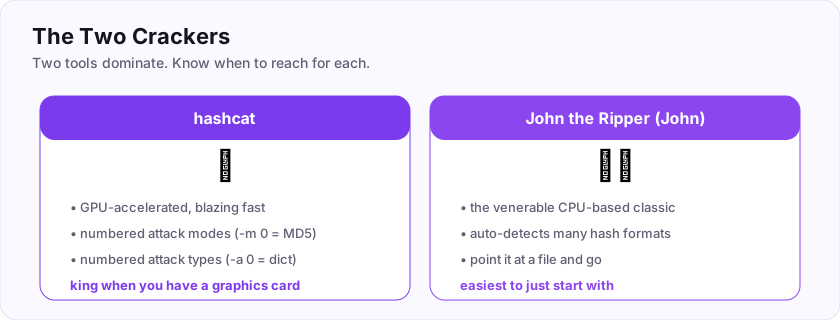
$ john --wordlist=rockyou.txt hashes.txt
$ hashcat -m 0 hashes.txt rockyou.txt
They take a wordlist, hash each guess the same way the system did, and compare — when two hashes match, they have found the password. John is easy to start with; hashcat is blazing fast on a graphics card. Both are the standard tools for password cracking.
Flag: ASEC{crack_the_hash}
John the Ripper and hashcat are tools for cracking ___?
+10 ptsNeed a hint?
They recover them from hashes.What is the flag for this task?
+10 ptsNeed a hint?
It is in bold at the end.Metasploit: The Exploit Framework
A library of ready-made attacks
Metasploit is a framework — a huge, organized collection of ready-made exploits, plus the machinery to launch them. Instead of writing an exploit from scratch, you pick one, set a couple of options, and fire.
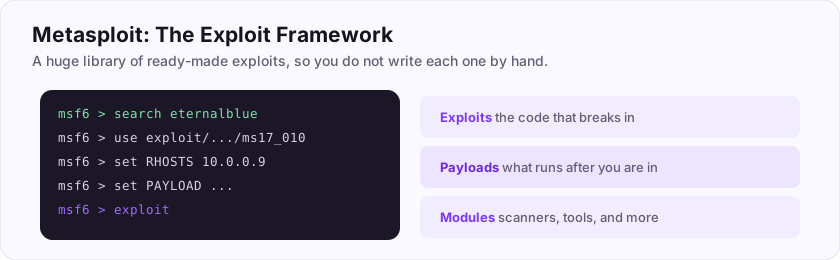
msf6 > use exploit/windows/smb/ms17_010_eternalblue
msf6 > set RHOSTS 10.0.0.9
msf6 > exploit
It bundles thousands of exploits, payloads (what runs after you break in), and scanner modules under one console. That scale is the point of a framework: it packages years of others' work so you can focus on the target, not on reinventing each attack.
Flag: ASEC{frameworks_scale_you}
Metasploit is a framework for launching ready-made ___?
+10 ptsNeed a hint?
The code that breaks into a system.What is the flag for this task?
+10 ptsNeed a hint?
It is in bold at the end.Hydra: Online Login Attacks
Guessing a live login
Hydra automates guessing usernames and passwords against a *live* service — an online attack, where each guess is sent to the real login (SSH, a web form, FTP, and more).
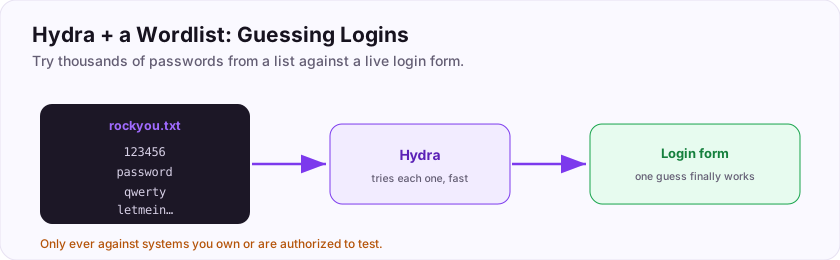
$ hydra -l admin -P rockyou.txt target.site http-post-form ...This differs from cracking hashes offline: here Hydra talks to the actual system, trying entries from a wordlist until one works. Because it hits a real service, it is noisy, slow, and often stopped by rate-limits or lockouts — but against weak passwords it still works.
Flag: ASEC{guess_the_login}
Hydra attacks a live service, so it performs an ___ login attack? (the opposite of offline)
+10 ptsNeed a hint?
It talks to the real system, not a stolen hash file.What is the flag for this task?
+10 ptsNeed a hint?
It is in bold at the end.Wordlists: rockyou.txt
The ammunition for guessing
Password crackers and login attackers are only as good as their wordlist — the file of candidate passwords they try. The most famous one is rockyou.txt.
rockyou.txt is a list of over 14 million real passwords leaked in a 2009 breach, and it ships with Kali. Because it contains passwords people actually used, it cracks weak accounts remarkably often. Tools like gobuster, hydra, john, and hashcat all take a wordlist as their ammunition.
/usr/share/wordlists/rockyou.txtrockyou.txt — 14M real leaked passwords — is the classic starting list.Flag: ASEC{words_are_ammo}
What is the filename of the most famous password wordlist (ships with Kali)?
+10 ptsNeed a hint?
rock-something dot txt.What is the flag for this task?
+10 ptsNeed a hint?
It is in bold at the end.Keeping Tools Updated
A sharp toolkit is an updated toolkit
Security tools change constantly — new checks, new exploits, bug fixes. Keeping them current is part of the job.
$ sudo apt update      # refresh the list of available versions
$ sudo apt upgrade     # install the newer versions
Run apt update first to refresh what is available, then apt upgrade to actually install the newer versions. Do this regularly so your tools have the latest capabilities — an out-of-date scanner might miss a vulnerability that a current one would catch.
apt update refreshes the package list; apt upgrade installs the newer versions. Keep your tools current.Flag: ASEC{stay_current}
Which two-word command refreshes the list of available packages before upgrading?
+10 ptsNeed a hint?
Run it with sudo in front.What is the flag for this task?
+10 ptsNeed a hint?
It is in bold at the end.Staying Organized: A Folder per Target
Keep your work tidy
Tools produce a lot of output — scans, screenshots, notes, loot. Without structure it becomes chaos, so professionals make one folder per target and keep everything about that engagement inside it.
$ mkdir -p target-acme/{scans,notes,loot}A simple layout — subfolders for scans, notes, and any files you retrieve — means you can always find what you gathered and reconstruct exactly what you did. This organization pays off enormously when you write the report or come back to a target days later.
Flag: ASEC{organize_your_work}
A good habit is to make one ___ per target to keep files organized? (one word)
+10 ptsNeed a hint?
Also called a directory.What is the flag for this task?
+10 ptsNeed a hint?
It is in bold at the end.Your Toolkit, Assembled
You know your kit
Look at everything you can now name and use. You can inspect the web (browser + DevTools, Burp), map networks (Nmap, Wireshark, Netcat), attack the web (Gobuster, Nikto), break passwords (John, hashcat, Hydra with rockyou.txt), scale up (Metasploit), script (Python), and keep it all installed and updated with apt — organized neatly, one folder per target.
You do not need to master all of these today. The goal was simply to know what each tool is *for*, so that when a room says "scan the target" or "crack this hash," you already know which tool to reach for. That map in your head is the real toolkit.
Your graduation flag for this room: ASEC{your_kit_is_ready}
Which tool from this room scans a machine for open ports?
+10 ptsNeed a hint?
The network mapper.What is your graduation flag for this room?
+15 ptsNeed a hint?
It is in bold at the very end.Reviews
No written reviews yet. Be the first once you have played the room.