How the Web Works
Every website runs on a simple conversation of requests and responses. Understand HTTP deeply and web application security suddenly makes sense.
The Web vs the Internet
The web is not the internet
People use the two words as if they mean the same thing, but they are different. The internet is the global network of cables, Wi-Fi and routers — the roads. The web is one of the things that travels on those roads: the pages, links and apps you open in a browser. Email and video calls also use the internet, but they are not "the web".
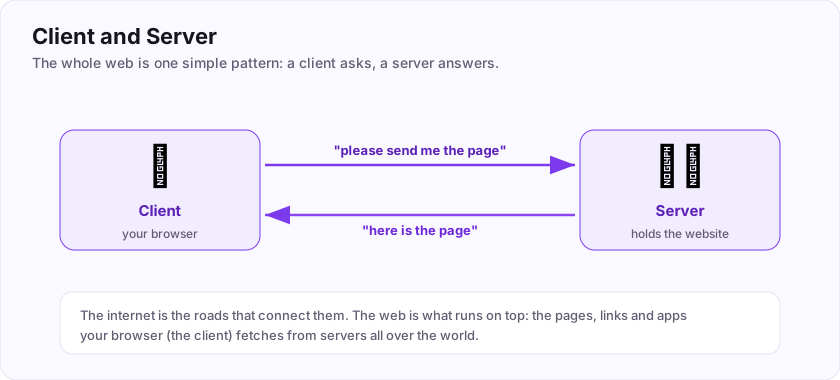
One pattern runs the whole web
- The client is the program that asks for things — usually your browser.
- The server is the computer that holds the website and answers.
You (the client) say "please send me the page"; the server replies "here is the page". That request-and-answer repeats for every page, image and click. That really is the core of the entire web.
Why a hacker cares
Because the client runs on *your* machine, you fully control it — you can inspect and change everything it sends. That single fact is the seed of most web hacking: never assume the client behaves.
Flag: ASEC{web_runs_on_the_internet}
In the web, the program that requests pages (like your browser) is called the what? (one word)
+10 ptsNeed a hint?
The opposite of the server.What is the flag for this task?
+10 ptsNeed a hint?
It is in bold at the end.What a Web Page Is Made Of
Three languages, one page
Open any website and you are really looking at three languages working together. A house analogy makes it click:
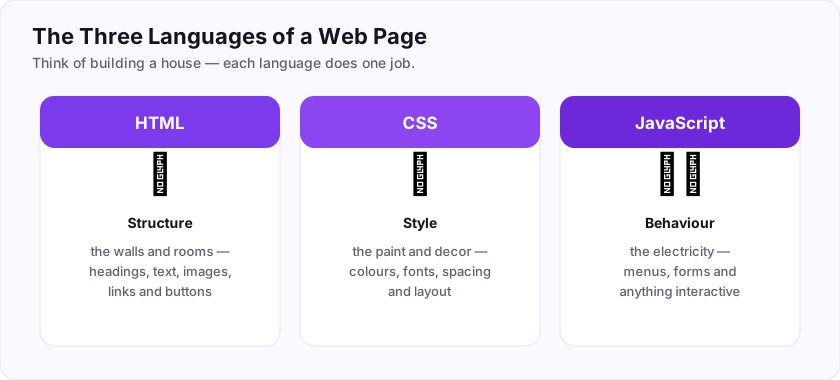
- HTML is the structure — the walls and rooms. It defines the headings, paragraphs, images, links and buttons. It is the skeleton every page is built on.
- CSS is the style — the paint and decoration. Colours, fonts, spacing and layout all come from CSS.
- JavaScript is the behaviour — the electricity. Menus that open, forms that check themselves, live updates — anything interactive is JavaScript running inside your browser.
Why a hacker cares
Because all three arrive at *your* browser, you can read and change them. Viewing the HTML source reveals hidden fields and forgotten comments. And because JavaScript runs in the browser, tricking a site into running the *attacker's* JavaScript — an attack called XSS — is one of the most common web vulnerabilities of all.
Flag: ASEC{html_css_javascript}
Which of the three web languages defines the structure and content of a page? (four letters)
+10 ptsNeed a hint?
The skeleton of the page.What is the flag for this task?
+10 ptsNeed a hint?
It is in bold at the end.Requests and Responses
The heartbeat of the web
Every single thing you do online is a request from your browser and a response from a server. Load a page, click a link, submit a form — request, response, over and over.
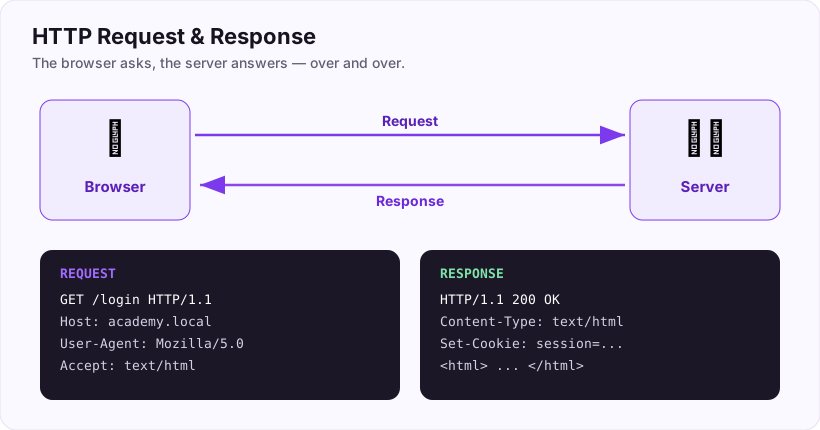
A request has four parts: a method (the verb), a path (which page), headers (extra info), and sometimes a body (data you are sending). The two methods you meet first:
- GET — "give me this page." Any data rides in the URL, visible in the address bar.
- POST — "here is some data for you." The data travels hidden in the body — which is exactly why a login form uses POST, keeping your password out of the address bar.
The response comes back with a status code and the content (usually the HTML of the page).
Why a hacker cares
Everything you test as a web hacker is a request you can modify. Change a value the page assumed you could not touch, and watch how the server reacts.
Which HTTP method is normally used to submit a login form?
+10 ptsNeed a hint?
Its data travels in the body.HTTP Methods: The Verbs of the Web
The verbs behind every click
You have met GET and POST. Here is the full beginner set of methods — the verbs that say what you want to do to a resource.
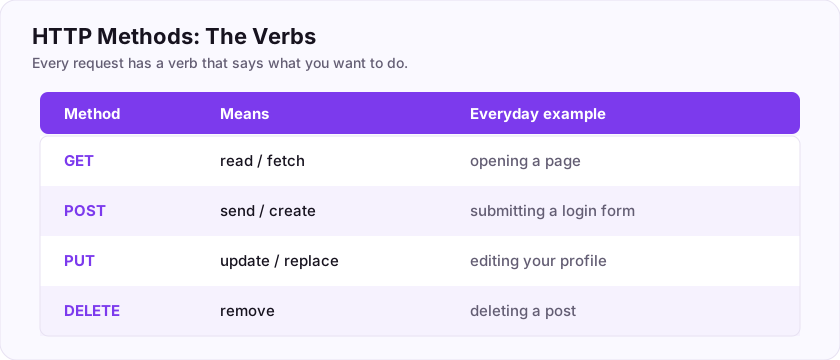
- GET — *read*. Simply fetch something, like opening a page. A GET should never change anything.
- POST — *send / create*. Submit new data, like posting a comment or logging in.
- PUT — *update / replace*. Change something that already exists, like editing your profile.
- DELETE — *remove*. Delete a resource, like removing a post.
Modern apps built on APIs use all four constantly. The quickest way to remember the two most common: GET reads, POST writes.
Why a hacker cares
Sometimes a page only shows you a GET button, but the server also quietly accepts DELETE or PUT. Trying other methods on the same address is a classic way to find actions you were never meant to reach.
Flag: ASEC{get_reads_post_writes}
Which HTTP method simply fetches or reads a page, without changing anything? (three letters)
+10 ptsNeed a hint?
GET reads, POST writes.What is the flag for this task?
+10 ptsNeed a hint?
It is in bold at the end.Status Codes
What the server is telling you
Every response opens with a three-digit status code, and the first digit tells you the whole story at a glance.
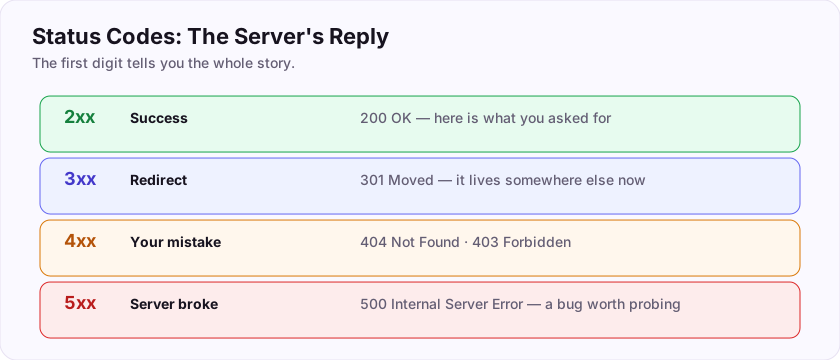
- 2xx — success. 200 OK means "here is what you asked for."
- 3xx — redirect. 301 means "it moved; go here instead."
- 4xx — your mistake. 404 means Not Found; 403 means Forbidden.
- 5xx — the server broke. Any code starting with 5 is a server-side error, like 500 Internal Server Error.
So 404 is Not Found, and anything beginning with 5 is a server error.
Why a hacker cares
Status codes are constant feedback. A 404 helps you map which pages exist; a sudden 500 right after you tamper with an input often means you triggered a bug worth digging into.
What status code means Not Found?
+10 ptsNeed a hint?
A 4xx client error.Which first digit marks a server-side error?
+10 ptsNeed a hint?
5xx.Headers: The Hidden Labels
The labels on every message
Beyond the method and body, every request and response carries headers — small labels that describe the message. You do not see them in normal browsing, but they are always there.
Some you will meet constantly:
- User-Agent — tells the server which browser and device you are using. So the header that identifies your browser is the User-Agent.
- Content-Type — says what kind of data is being sent (a web page, an image, JSON).
- Set-Cookie and Cookie — how the site remembers you (the next task).
- Authorization — carries login tokens for APIs.
Why a hacker cares
Headers are fully under your control on the request side. Faking a User-Agent, tampering with an Authorization token, or spotting a revealing Server header are everyday moves. Open your browser's Developer Tools, go to the Network tab, and read the headers of any request.
Flag: ASEC{headers_carry_metadata}
Which request header tells the server which browser you are using?
+10 ptsNeed a hint?
Two words joined by a hyphen.What is the flag for this task?
+10 ptsNeed a hint?
It is in bold at the end.State, Headers and Cookies
How a forgetful web remembers you
Here is a surprising truth: HTTP is stateless. On its own, each request knows nothing about the one before it — the server forgets you the instant it answers. So how do sites keep you logged in? With cookies.
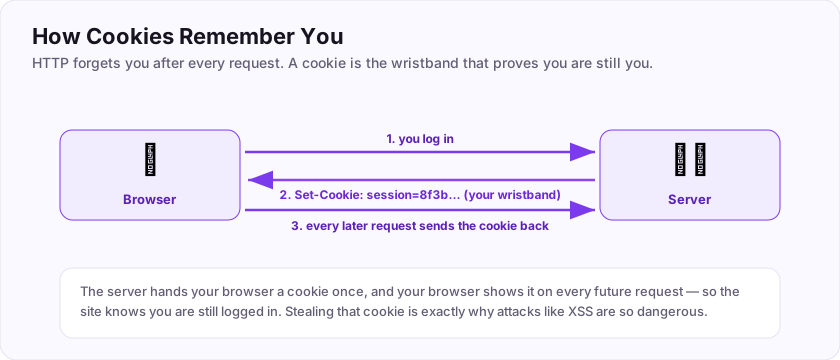
The flow is simple:
- You log in.
- The server replies with a
Set-Cookieheader — a little ID, like a wristband at an event. - Your browser automatically shows that cookie on every future request, so the server recognises you.
That cookie usually points to a session stored on the server, which holds "who you are" for as long as you stay logged in.
Why a hacker cares
The session cookie *is* your identity to the site. If an attacker steals it (often via the XSS attack you will meet later), they become you — no password needed. That is why cookies carry protective flags like HttpOnly and Secure.
Your flag for this task: ASEC{http_is_stateless}
What is the flag hidden in this task?
+15 ptsNeed a hint?
Read the last line.Putting It All Together: Submitting a Form
One story, every piece
Let's tie the room together with something you do daily: logging in. Watch how every concept appears in one short sequence.
- You open the login page — your browser sends a GET request, and the server responds with HTML (structure), styled by CSS, made interactive by JavaScript.
- You type your details and click submit. Because it is sensitive data, the browser sends a POST request with your username and password in the body, not the URL.
- The server checks them and replies with a success status code and a Set-Cookie header.
- Your browser stores that cookie and sends it on every later request, so you stay logged in across the stateless web.
Networking moved the packets; the web layered this whole conversation on top. When you can narrate this login from click to cookie, you truly understand how the web works — and you can see exactly where an attacker would probe.
Your graduation flag for this room: ASEC{you_understand_the_web}
When you submit a login form, which HTTP method does the browser use?
+10 ptsNeed a hint?
Its data goes in the hidden body.What is your graduation flag for this room?
+15 ptsNeed a hint?
It is in bold at the very end.Job-Ready Notes
Job-Ready Notes
Tools to know: Burp Suite, OWASP ZAP, ffuf, sqlmap, nikto, browser dev tools.
Cheat sheet
ffuf -u https://target/FUZZ -w wordlist.txt        # content discovery
sqlmap -u "https://target/?id=1" --batch           # test for SQLi
Interview practice
- Explain reflected vs stored vs DOM XSS.
- How do prepared statements stop SQL injection?
- What is CSRF and how do you defend against it?
Reviews
No written reviews yet. Be the first once you have played the room.