Intro to Web Security
A gentle introduction to how web applications work and where they break. You will inspect requests, read page source, and understand why user input can never be trusted. No prior experience required.
Welcome: How Hackers See the Web
Your first hacking room
Welcome — this is where it starts. You do not need special software or a scary black screen for web hacking. Your everyday browser is the tool, and the whole game begins with one shift in how you see a website.
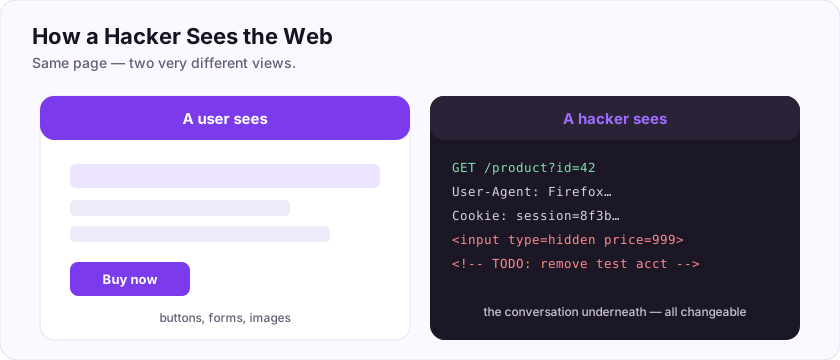
A normal user sees a pretty page: buttons, forms, images. A hacker sees the conversation underneath — the requests and responses, the hidden fields, the code the site sent you. And here is the key realisation: your browser runs on your computer, so you control everything it sends.
That means the answer to "can the website trust what my browser sends?" is a firm no. A price in a form, a hidden field, a check written in JavaScript — you can change all of it. Almost every web vulnerability grows from that single truth.
This room teaches you to *see* the web that way, using the tools already built into your browser.
Flag: ASEC{the_client_lies}
The browser (client) runs on the user's machine, so can everything it sends be trusted? (yes/no)
+10 ptsNeed a hint?
The user can change it.What is the flag for this task?
+10 ptsNeed a hint?
It is in bold at the end.How the web really works
Every page is a conversation
Every time you open a site, your browser sends an HTTP request and the server sends a response back. Hackers care about that conversation because everything a site trusts — headers, cookies, form fields — travels through it and can be changed.
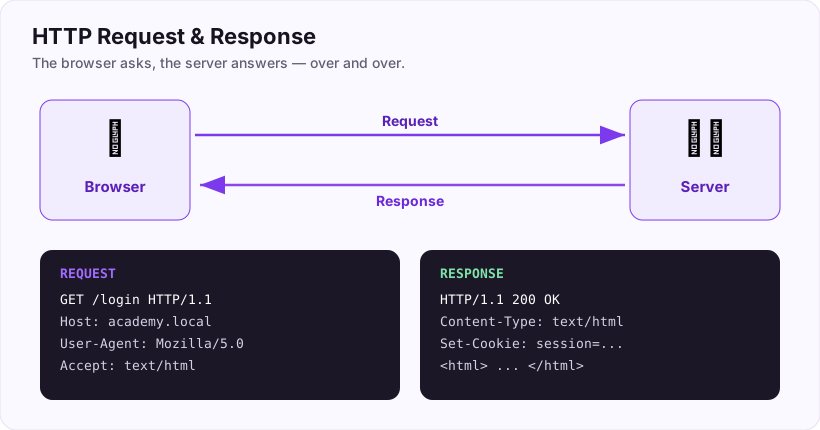
A request carries headers: little labels describing who is asking. One you will meet constantly is the User-Agent, which tells the server which browser you are using.
See it yourself
- Press F12 to open Developer Tools, then click the Network tab.
- Refresh the page and click the first request.
- Look under "Request Headers" and find
User-Agent.
GET / HTTP/1.1
Host: academy.local
User-Agent: Mozilla/5.0 (...) Firefox/125.0
Because *you* send that header, you can also change it — sites that trust the User-Agent to decide what you can do are trusting something you fully control.
What HTTP header identifies the browser making a request?
+10 ptsNeed a hint?
It literally tells the server which agent (browser) you are.Your Toolbox: Developer Tools
The most important tool you already have
Every modern browser hides a full hacking toolkit behind one key: F12 (or right-click, then Inspect). It opens Developer Tools, and you will live in these tabs:
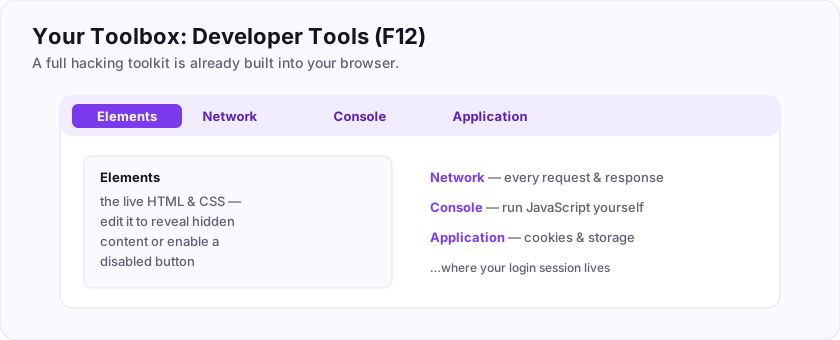
- Elements — the live HTML and CSS of the page. Edit it right there to reveal hidden content or re-enable a disabled button.
- Network — every request and response, with headers, status codes, and data. The heart of web testing.
- Console — run JavaScript on the page yourself.
- Application (or Storage) — cookies and local storage, where your login session lives.
Spending ten minutes poking these tabs on any site will teach you more than hours of reading.
Flag: ASEC{f12_is_your_friend}
Which keyboard key usually opens the browser's Developer Tools?
+10 ptsNeed a hint?
A function key.What is the flag for this task?
+10 ptsNeed a hint?
It is in bold at the end.Reading the source
The page ships its code to you
Websites send their front-end code straight to your browser, which means you can read it. Developers sometimes leave notes in comments — written as <!-- like this --> — that browsers ignore but which sit in the source for anyone who looks.
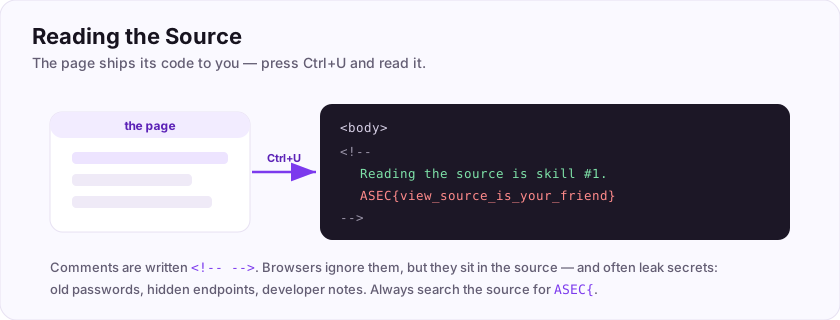
Find the hidden flag, step by step
- Right-click this page and choose View Page Source (or press Ctrl+U). A new tab shows the raw HTML.
- Press Ctrl+F to search the source and type
ASEC{. - You will land inside an HTML comment — the flag is right there.
<!--
    Reading the source is the first skill every hacker learns.
    ASEC{view_source_is_your_friend}
-->
The syntax for a comment browsers ignore is <!-- -->. Real sites leak surprising things this way: old passwords, hidden endpoints, developer notes.
ASEC{. HTML comments are written <!-- -->, and they are a classic place secrets hide.Find the hidden flag in this page HTML source.
+20 ptsNeed a hint?
Ctrl+U, then search the page for ASEC{What HTML syntax is used to write a comment that browsers ignore?
+10 ptsNeed a hint?
It opens with an angle bracket and an exclamation mark.Never Trust the Client
The golden rule of web security
If you remember one sentence from this whole platform, make it this: never trust the client. Everything that happens in the browser — the page, the JavaScript, the form values — is on the user's machine and can be changed by them.
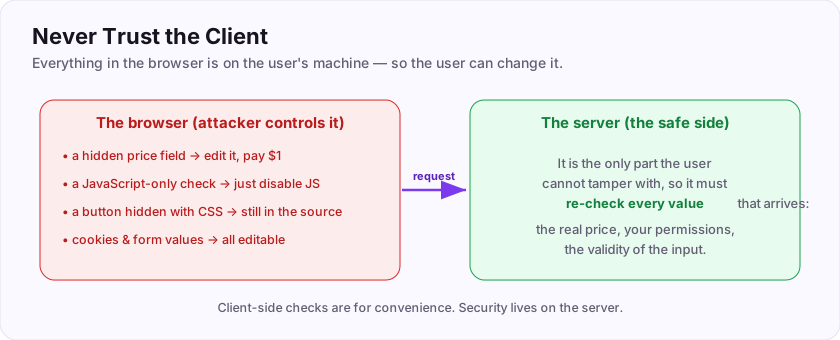
Real examples of this rule being broken:
- A shop stores the price in a hidden form field. Change it in Dev Tools and pay next to nothing for a laptop.
- A form checks your input only in JavaScript. Turn JavaScript off, or send the request directly, and the check vanishes.
- A page hides an admin button with CSS. The button — and what it does — is still right there in the source.
The fix is always the same: the server must re-check everything, because it is the only part the user cannot tamper with. Never trust user input.
Flag: ASEC{never_trust_the_client}
The golden rule is to never trust the client, also stated as never trust user ___? (one word)
+10 ptsNeed a hint?
What the user sends you.What is the flag for this task?
+10 ptsNeed a hint?
It is in bold at the end.The Big Three Web Vulnerabilities
What you will hunt for
Web vulnerabilities fill long lists (look up the OWASP Top 10), but three come up again and again. Meet them now — you have a dedicated room for each.
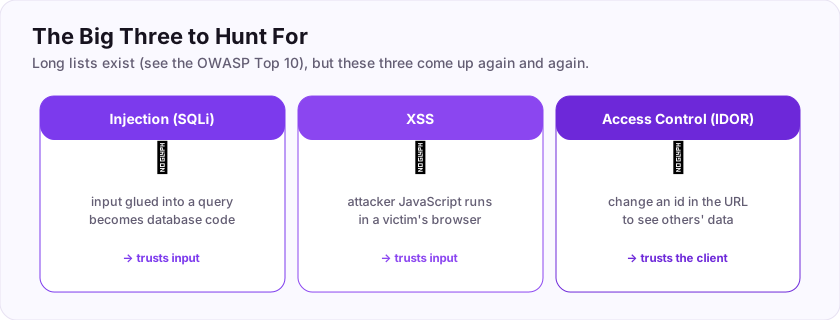
- Injection (SQL injection) — user input is glued into a database query and becomes code, letting an attacker read or bypass data.
- Cross-Site Scripting (XSS) — a site reflects your input into a page unsafely, so the attacker's JavaScript runs in a victim's browser.
- Broken Access Control (IDOR) — the app fails to check you are allowed to see something, so changing an id in the URL shows another user's data.
Notice the common thread: all three come back to trusting input or the client that should not be trusted.
Flag: ASEC{know_the_big_three}
Which web vulnerability runs the attacker's JavaScript in a victim's browser? (three letters)
+10 ptsNeed a hint?
Cross-Site Scripting.What is the flag for this task?
+10 ptsNeed a hint?
It is in bold at the end.Finding Flags: A Beginner's Method
A simple method for any web room
When you face a new web challenge, do not just poke randomly. Follow a calm checklist:
- Look first. Check the page source (Ctrl+U) and the Elements tab for comments, hidden fields, and clues — before you type anything.
- Watch the traffic. Open the Network tab and see what requests the page makes and what comes back.
- Explore inputs. Try forms and search boxes; note how the app reacts. A single quote
'tests for injection;<script>tests for XSS. - Play with the URL. Change ids and parameters (
?id=1to?id=2) to test access control. - Read errors. Error messages often reveal exactly what is happening underneath.
The habit that separates beginners from the stuck is step 1: look before you type.
Flag: ASEC{look_before_you_type}
What should you always check first on a web page for hidden comments and flags? (two words)
+10 ptsNeed a hint?
Ctrl+U shows it.What is the flag for this task?
+10 ptsNeed a hint?
It is in bold at the end.Putting It All Together
You can hack the web
Let's tie your first room together. Web hacking is not magic — it is a mindset plus a few built-in tools.
- The browser is yours, so everything it sends can be changed — the client is always untrusted.
- Developer Tools (F12) let you read the page, watch the traffic, run JavaScript, and inspect cookies.
- View source reveals comments and secrets developers forgot.
- The golden rule — never trust the client — explains why the big vulnerabilities (injection, XSS, access control) exist.
- A calm method — look, watch, probe, tweak, read — finds flags reliably.
You now see websites the way an attacker does. Every specialised room from here builds on exactly this foundation.
Your graduation flag for this room: ASEC{you_can_hack_the_web}
Everything the browser sends can be changed, so the client is always ___? (one word)
+10 ptsNeed a hint?
The opposite of trusted.What is your graduation flag for this room?
+15 ptsNeed a hint?
It is in bold at the very end.Deep Dive & Field Practice
Look under the hood
Every web attack starts with looking closely. Open your browser developer tools to read the page source, inspect requests, and watch what the site sends.
The single most important lesson: client-side controls are not security. A hidden field, a disabled button, or JavaScript validation can all be changed by the user. If a rule matters, the server must enforce it. Practise by intercepting a request with a proxy and changing a value the page assumed you could not touch.
The flag: ASEC{client_side_is_not_security}
Can JavaScript form validation be relied on for security? (yes/no)
+10 ptsNeed a hint?
The user controls the client.What is the flag?
+10 ptsNeed a hint?
Read the last line.Job-Ready Notes
Job-Ready Notes
Tools to know: Burp Suite, OWASP ZAP, ffuf, sqlmap, nikto, browser dev tools.
Cheat sheet
ffuf -u https://target/FUZZ -w wordlist.txt        # content discovery
sqlmap -u "https://target/?id=1" --batch           # test for SQLi
Interview practice
- Explain reflected vs stored vs DOM XSS.
- How do prepared statements stop SQL injection?
- What is CSRF and how do you defend against it?
Reviews
No written reviews yet. Be the first once you have played the room.