Linux Fundamentals
Most security tooling lives on Linux. This room walks through navigating the filesystem, reading files, and finding things, so the terminal stops being scary and starts being powerful.
Why Linux?
The hacker's home turf
Almost every security tool, server, and hacking distribution runs on Linux. If you want to work in security, getting comfortable here is not optional — it is the ground everything else stands on. The good news: it is far friendlier than it looks.
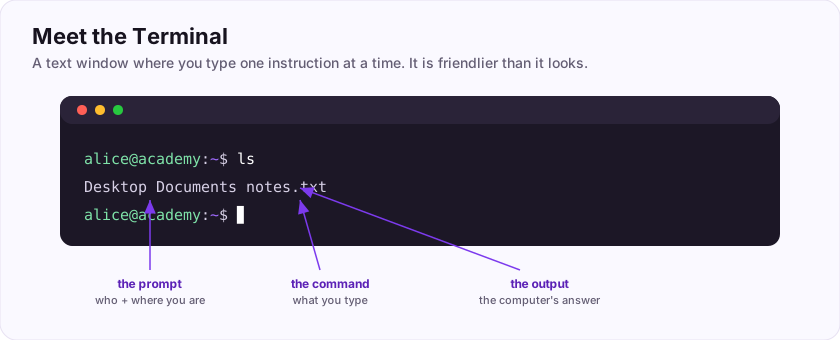
Most of the time you will not click around a desktop; you will type into a terminal — a text window where you give the computer instructions one line at a time. (The program that reads your commands is called the shell.)
Why type instead of click?
- Precision — a command does exactly one thing, exactly the same way, every time.
- Power — you can chain commands to do in one line what would take dozens of clicks.
- Automation — anything you can type, you can script and repeat.
At first the blinking prompt feels intimidating. By the end of this room it will feel like a superpower.
Flag: ASEC{the_terminal_is_power}
What do we call the text-based interface where you type commands? (one word)
+10 ptsNeed a hint?
The black window with a prompt.What is the flag for this task?
+10 ptsNeed a hint?
It is in bold at the end.The Filesystem: A Tree
Everything hangs off one root
In Linux, all your files live in a single upside-down tree. At the very top is the root, written as a single slash: /. Everything else branches off it.
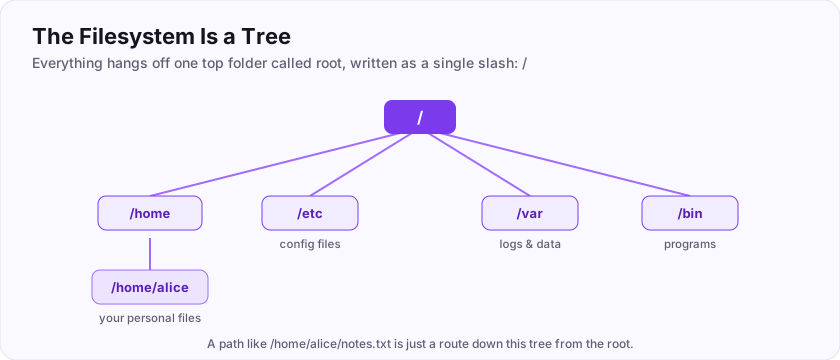
A few branches you will meet constantly:
/— the root, the top of everything./home— where users' personal files live (yours might be/home/alice)./etc— system configuration files./var— logs and changing data.
Paths: how you point at a file
A path is the address of a file, and there are two kinds:
- Absolute path — starts from the root, like
/home/alice/notes.txt. It works from anywhere. - Relative path — starts from where you currently are, like
notes.txtor../photos.
Think of an absolute path as a full postal address, and a relative path as "two doors down from here".
Flag: ASEC{everything_under_root}
In Linux, what single character represents the very top (root) of the filesystem?
+10 ptsNeed a hint?
A single slash.What is the flag for this task?
+10 ptsNeed a hint?
It is in bold at the end.Finding your way around
Three commands do most of the walking
Now let's move around that tree. Three commands handle almost all navigation:
pwd— *print working directory*. It tells you where you currently are.ls— *list*. It shows what is in the current directory.cd— *change directory*. It moves you into another folder.
A typical little journey looks like this:
$ pwd
/home/alice
$ ls
Desktop  Documents  notes.txt
$ cd Documents
$ pwd
/home/alice/Documents
Two handy shortcuts: cd .. goes up one level, and cd on its own jumps straight back to your home directory.
pwd shows where you are, ls lists what is here, and cd moves you around. That trio is your compass.Which command prints your current working directory?
+10 ptsNeed a hint?
Print Working Directory.Which command lists the contents of a directory?
+10 ptsNeed a hint?
Two letters, short for list.Reading files
Look inside without opening an app
Once you can move around, you need to read files — often to hunt for a flag. Two commands do the heavy lifting:
cat— prints a whole file straight to the screen. Great for short files.
$ cat notes.txt
remember to water the plantsgrep— searches *inside* files for a word or pattern, and prints only the matching lines. Indispensable when a flag is buried in a huge file.
$ grep ASEC notes.txt
ASEC{example}
For long files, less lets you scroll page by page (press q to quit).
cat prints a whole file; grep finds a pattern inside files. To hunt a flag in a big file, grep is your best friend.Which command searches for a pattern inside files?
+10 ptsNeed a hint?
It stands for Global Regular Expression Print.Which command prints an entire file to the terminal?
+10 ptsNeed a hint?
It concatenates and prints files.Everything Is a File (and Permissions)
In Linux, almost everything is a file
Linux has a famous idea: nearly everything — documents, devices, even settings — is treated as a file. That simplicity is powerful, but it raises a question: who is allowed to read or change each file? The answer is permissions.
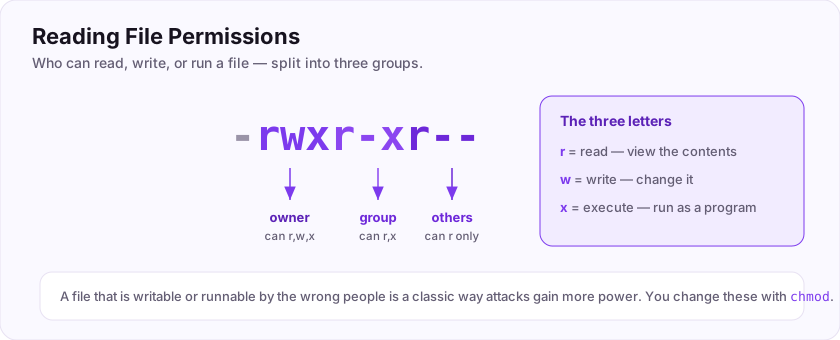
Every file has three permissions:
- r = read (view the contents)
- w = write (change it)
- x = execute (run it as a program)
These are set for the file's owner, its group, and everyone else. So a listing like rwxr-xr-- means the owner can read/write/execute, the group can read/execute, and others can only read. The letter that means "run it as a program" is x.
You change permissions with chmod. This matters for security because a file that is writable or executable by the wrong people is a classic way attacks gain more power.
Flag: ASEC{read_write_execute}
In a permission like rwx, which single letter means the file can be run as a program?
+10 ptsNeed a hint?
e(x)ecute.What is the flag for this task?
+10 ptsNeed a hint?
It is in bold at the end.Users, Root, and sudo
Not everyone is equal
Linux is multi-user, and one account towers above the rest: root, the all-powerful administrator. Root can read any file, change any setting, and run anything. Your normal user account is deliberately limited — which is a *good* thing.
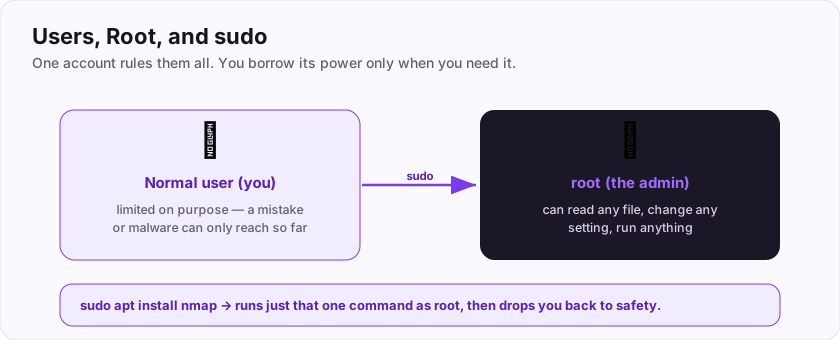
When you need to do something powerful, you borrow root's power for a single command with sudo (say it "super-user do"):
$ sudo apt install nmapThe system asks for your password, runs that one command as root, and then you are back to your safe, limited account.
Why this matters so much in security
- For defenders: running day-to-day as a limited user means a mistake or malware has limited reach. This is least privilege.
- For attackers: the whole goal of "privilege escalation" is to go from a limited user *to* root. Understanding root is understanding the prize.
sudo to borrow its power one command at a time, and stay a limited user the rest of the time.Flag: ASEC{root_is_king}
What is the name of the all-powerful administrator account on Linux? (one word)
+10 ptsNeed a hint?
sudo borrows its power.What is the flag for this task?
+10 ptsNeed a hint?
It is in bold at the end.Piping and Combining Commands
Small tools, joined together
The real magic of the command line is combining simple commands into something powerful. The core idea, the Unix philosophy, is: each tool does one job well, and you connect them.
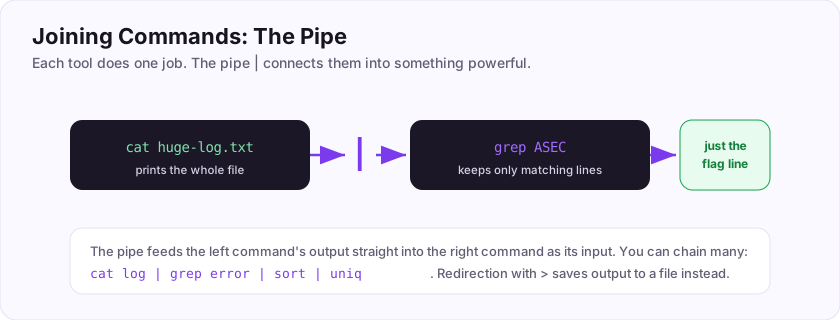
The pipe, written |, takes the output of one command and feeds it as the input of the next:
$ cat huge-log.txt | grep ASECThat reads the whole file but pipes it into grep, so you only see the lines containing ASEC. You can chain several: ... | grep error | sort | uniq.
There is also redirection: > sends output into a file instead of the screen (ls > list.txt), and < reads input from a file.
The character that connects one command's output to the next is the pipe, |.
| pipe joins commands: the left one's output becomes the right one's input. It is how a few tiny tools solve big problems.Flag: ASEC{pipe_them_together}
Which single character sends one command's output into the next command as input?
+10 ptsNeed a hint?
It is called the pipe.What is the flag for this task?
+10 ptsNeed a hint?
It is in bold at the end.Putting It All Together: Finding a Flag
Your first real hunt
Let's combine everything into the task you will do a hundred times: finding a flag hidden somewhere in a filesystem.
A typical hunt:
- See where you are —
pwd. - Look around —
ls. - Move into a promising folder —
cd Documents. - Read a short file —
cat notes.txt. - When files are big or many, search them all at once —
grepis the command that searches inside files for a pattern like a flag:
$ grep -r ASEC /home/alice
/home/alice/Documents/secret.txt:ASEC{example}
The -r means "search recursively", through every file in every sub-folder.
Navigate, read, search — that loop, plus permissions, users, and pipes, is the everyday Linux you need to start doing security work.
Your graduation flag for this room: ASEC{you_understand_linux}
Which command searches inside files for a pattern like a flag?
+10 ptsNeed a hint?
Global Regular Expression Print.What is your graduation flag for this room?
+15 ptsNeed a hint?
It is in bold at the very end.Deep Dive & Field Practice
Own the command line
Linux runs most of the internet, so fluency in the shell is non-negotiable. Two ideas unlock a lot: everything is a file, and permissions decide who can do what.
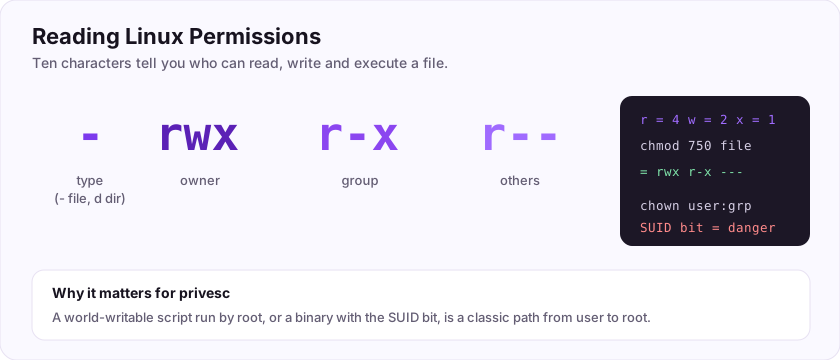
Learn to read a permission string, follow paths, pipe commands together (grep, find, awk), and inspect processes. These basics are exactly what you will lean on when you escalate privileges or investigate a compromised host.
The flag: ASEC{everything_is_a_file}
In "rwxr-x---", can members of the group execute the file? (yes/no)
+10 ptsNeed a hint?
Look at the middle triplet: r-x.What is the flag?
+10 ptsNeed a hint?
Read the last line.Job-Ready Notes
Job-Ready Notes
Tools to know: bash, LinPEAS, GTFOBins, find/grep, tmux.
Cheat sheet
sudo -l                              # what can I run as sudo?
find / -perm -4000 2>/dev/null       # find SUID binaries
Interview practice
- What is the SUID bit and why can it be dangerous?
- How do you find files a given user can write to?
- Explain what permission "755" means.
Reviews
No written reviews yet. Be the first once you have played the room.