OSINT Fundamentals
Open Source Intelligence is the art of gathering information from public sources. This room introduces search operators and the metadata that files quietly carry with them.
What Is OSINT?
Intelligence hiding in plain sight
OSINT stands for Open Source Intelligence — gathering useful information from sources that are freely, publicly available. No hacking, no breaking in; just careful looking. And the amount you can learn from public data alone is astonishing.
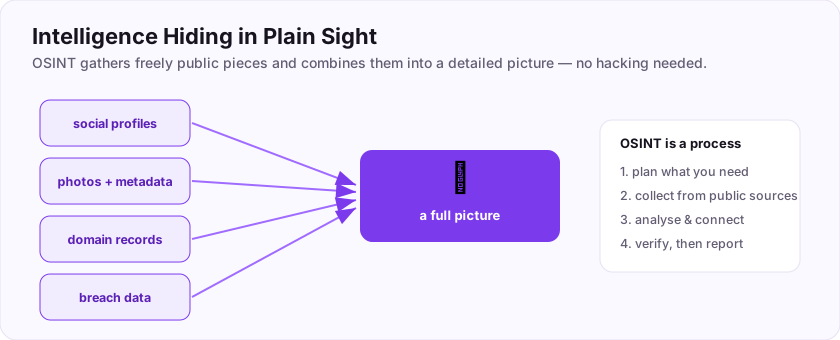
Think about what is out there for almost anyone: social media profiles, company websites, job adverts, public records, photos with hidden location data, domain registrations, and leaked data from old breaches. On its own each is a puzzle piece; combined, they paint a detailed picture.
Why it matters in security
- Attackers start almost every operation with OSINT — it is the "Reconnaissance" phase of the kill chain.
- Defenders use OSINT to see what an attacker would find, and to reduce their own exposure.
- Investigators and journalists use it to verify facts and find people.
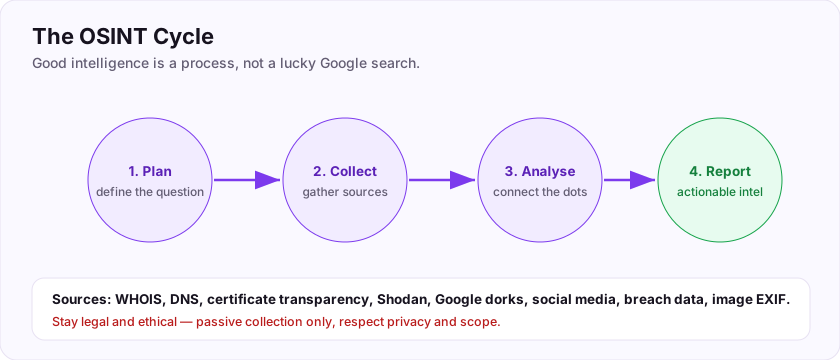
OSINT is a *process*, not a lucky search: plan what you need, collect from public sources, analyse, and report.
Flag: ASEC{hiding_in_plain_sight}
OSINT gathers information from sources that are public or private? (one word)
+10 ptsNeed a hint?
The "Open Source" in OSINT.What is the flag for this task?
+10 ptsNeed a hint?
It is in bold at the end.Search like an investigator
Turn a search engine into a scalpel
Most people type a few words into Google. Investigators use operators — special commands that narrow results dramatically. Combining them is famously called Google dorking.
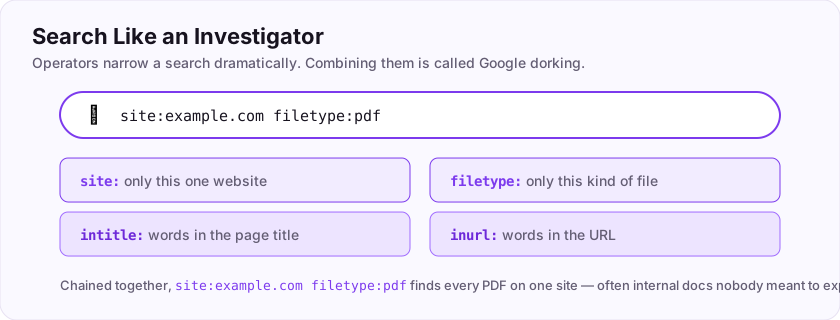
Two you will use constantly:
site:restricts results to a single website.site:example.comshows only pages on that domain.filetype:finds a specific kind of document.filetype:pdfreturns only PDFs.
Chain them: site:example.com filetype:pdf finds every PDF published on that one site — often revealing internal documents nobody meant to be found. Other handy operators include intitle: (words in the page title) and inurl: (words in the URL).
site: limits results to one website; filetype: finds one kind of file. Combining operators is Google dorking. (Remember the colons.)Which Google operator restricts results to a single website?
+10 ptsNeed a hint?
Include the colon.Which Google operator finds a specific file type?
+10 ptsNeed a hint?
Include the colon.Finding People: Usernames and Emails
People leave a trail
A huge part of OSINT is connecting the pieces a person scatters across the internet. Two threads are especially useful: usernames and email addresses.
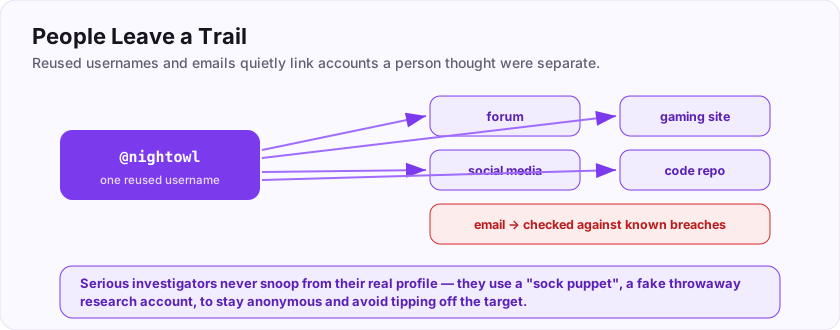
- Usernames. People reuse the same handle everywhere. Find it on one site and tools can hunt for that same username across hundreds of others, linking accounts a person thought were separate.
- Emails. An email can reveal linked accounts, and services exist to check whether it appeared in a known data breach — old leaked passwords are a goldmine (and a warning to use unique passwords yourself).
Sock puppets
Serious investigators do not use their real account to snoop. They use a sock puppet — a fake, throwaway research profile — to stay anonymous and avoid tipping off the target.
Flag: ASEC{people_leave_traces}
A fake, throwaway research account used to investigate anonymously is called a sock ___? (one word)
+10 ptsNeed a hint?
Sock ______.What is the flag for this task?
+10 ptsNeed a hint?
It is in bold at the end.Reverse Image Search and Geolocation
A photo tells a story
Images are one of OSINT's richest sources. Two techniques turn a single photo into a lead.
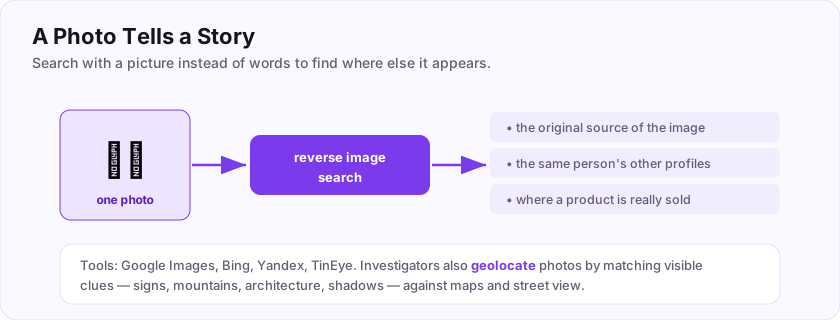
- Reverse image search — instead of searching with words, you search *with a picture*. Upload an image (or paste its URL) into Google Images, Bing, Yandex or TinEye, and it finds where else that photo appears online — revealing the original source, a person's other profiles, or a product's real seller. Searching by uploading the image is called reverse image search.
- Geolocation — investigators pinpoint *where* a photo was taken by matching visible clues (signs, mountains, architecture, shadows) against maps and street view. It is a whole OSINT sport of its own.
Flag: ASEC{a_photo_tells_a_story}
Searching for where a photo appears online by uploading the image is called ___ image search? (one word)
+10 ptsNeed a hint?
The opposite of forward.What is the flag for this task?
+10 ptsNeed a hint?
It is in bold at the end.Hidden in the metadata
Files say more than they show
Beyond what you see, files quietly carry metadata — data about the data. Photos are the classic example: they embed EXIF data, which can include the camera model, the exact timestamp, and sometimes the GPS coordinates of where the shot was taken.
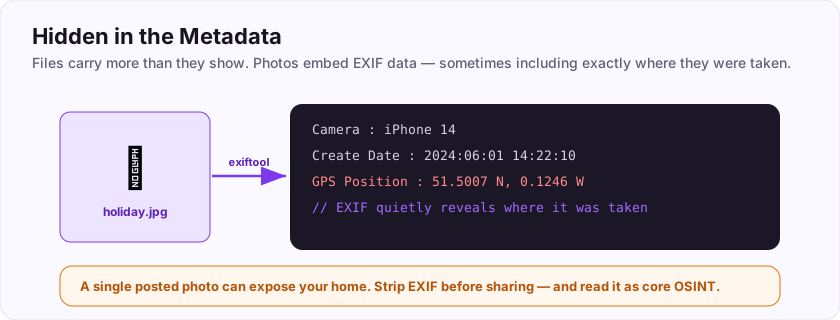
That means a single holiday photo posted online can silently reveal someone's home or location. The embedded photo data that can expose where an image was taken is EXIF.
You can read it with tools like exiftool, or online EXIF viewers:
$ exiftool photo.jpg
GPS Position : 51.5007 N, 0.1246 W
Create Date  : 2024:06:01 14:22:10
Stripping metadata before sharing matters for privacy — and reading it is core OSINT. Remember, gathering all this public information is abbreviated OSINT.
What kind of embedded photo data can reveal where an image was taken?
+15 ptsNeed a hint?
A four-letter acronym for the image metadata format.Gathering intelligence from publicly available sources is abbreviated as?
+10 ptsNeed a hint?
It is in the name of this room.Mapping a Target Online
From one clue to a whole picture
When the target is an organisation, OSINT builds a map of its online presence — the same "attack surface" an attacker studies.
Public records do a lot of the work:
- WHOIS — the public record of who registered a domain and when. It can reveal names, emails, and registration dates.
- DNS records — reveal mail servers, subdomains, and hosting providers.
- Certificate transparency logs — list every TLS certificate a company was issued, exposing subdomains linked nowhere else.
- Shodan — a search engine for internet-connected devices, showing what a company has exposed online.
The public record listing who registered a domain and when is WHOIS.
Flag: ASEC{map_the_target}
Which public record lists who registered a domain and when? (one word)
+10 ptsNeed a hint?
It literally asks "who is".What is the flag for this task?
+10 ptsNeed a hint?
It is in bold at the end.OSINT Ethics and Staying Safe
Powerful tools, real responsibility
OSINT is legal — it uses public information — but *how* you use it absolutely matters. The line between research and harm is about intent and impact.
- Do: research your own footprint, assess a company you are authorised to test, verify facts, learn.
- Do not: stalk, harass, dox, or intimidate anyone. Using these techniques to target an individual is never acceptable — and is often a crime.
So, is it acceptable to use OSINT to stalk or harass someone? No — clearly and always.
Protect yourself too
Turn OSINT on your *own* accounts: what can a stranger find about you? Lock down privacy settings, strip photo metadata, and use unique passwords so an old breach cannot unlock your life.
Flag: ASEC{osint_needs_ethics}
Is it acceptable to use OSINT techniques to stalk or harass someone? (yes/no)
+10 ptsNeed a hint?
Intent is everything.What is the flag for this task?
+10 ptsNeed a hint?
It is in bold at the end.Putting It All Together: An Investigation
Run it like a process
Real OSINT is a calm, repeatable cycle, not random googling. Let's walk the beginner workflow.
- Plan — decide exactly what you need to find and why.
- Collect — use search operators (
site:,filetype:), usernames, emails, images, metadata, and public records. - Analyse — connect the pieces; each clue points to the next.
- Verify — confirm findings with a second source before you trust them.
- Report — write up what you found and how, so it can be checked.
Do it ethically, from a sock puppet, and always double-check. That whole discipline — gathering intelligence from public sources — is what we abbreviate as OSINT, and you now know how to begin.
Your graduation flag for this room: ASEC{you_are_an_investigator}
The abbreviation for gathering intelligence from public sources is ___? (five letters)
+10 ptsNeed a hint?
It is the name of this room.What is your graduation flag for this room?
+15 ptsNeed a hint?
It is in bold at the very end.Deep Dive & Field Practice
Precision searching
Search engines are a scalpel if you use their operators. site:, filetype:, intitle: and quotes turn a vague query into a precise one — the basis of Google dorking.
Combine dorks with WHOIS, DNS and social media to build a picture of a target from public data alone. Stay passive and in-scope: good OSINT never pokes the target directly.
The flag: ASEC{google_is_a_scalpel}
Which Google operator limits results to one website? (include the colon)
+10 ptsNeed a hint?
site of the domain.What is the flag?
+10 ptsNeed a hint?
Read the last line.Job-Ready Notes
Job-Ready Notes
Tools to know: Shodan, theHarvester, Maltego, crt.sh, Google dorks, Sherlock.
Cheat sheet
theHarvester -d example.com -b all     # emails, hosts, subdomains
# crt.sh -> search a domain for issued certs (subdomains)
Interview practice
- Describe the four stages of the OSINT cycle.
- Name three passive reconnaissance sources.
- Why must OSINT stay passive and in-scope?
Reviews
No written reviews yet. Be the first once you have played the room.