Setting Up Your Free Practice Lab
You do not need to spend money or be technical. Pick the option that fits your computer.
Two Ways to Start (Pick One)
You have options
You can begin with nothing but the browser you are reading this in. When you want hands-on tools, a virtual machine gives you a whole second computer safely walled off from your real one.
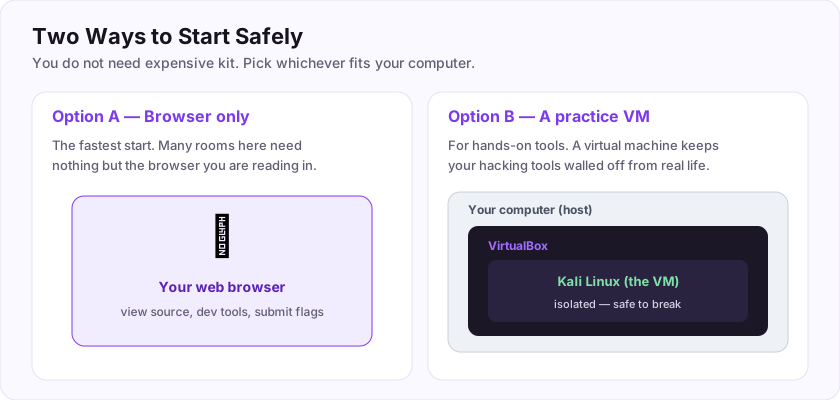
- Option A — Browser only. Many rooms (including your first hack in this path) need nothing else. Start here today.
- Option B — A practice VM. For tool-based rooms, run Kali Linux inside VirtualBox. It is free, and if you break something you just reset it.
Which option keeps your hacking tools isolated from your real computer? (answer A or B)
+10 ptsNeed a hint?
The one with a virtual machine.What Is a Virtual Machine?
A whole computer, inside your computer
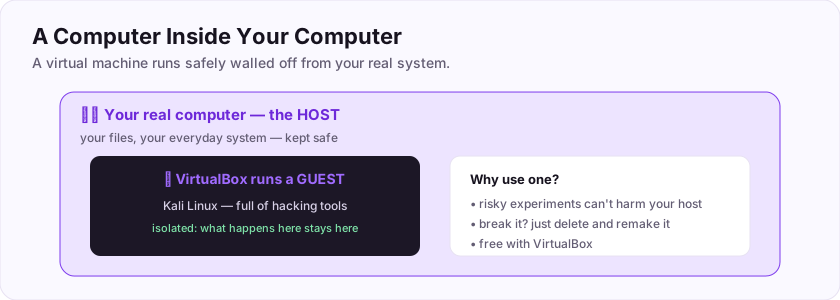
When you want to run hacking tools (or attack a practice target), you do not want it touching your real files and system. The solution is a virtual machine (VM) — software that pretends to be a whole separate computer, running safely inside your real one.
The vocabulary:
- Your real, physical computer is the host.
- The virtual computer running inside it is the guest.
- Software like VirtualBox (free) creates and runs guests.
The real computer that runs a virtual machine is the host. The magic is isolation: whatever happens inside the guest — malware, a broken tool, a risky experiment — stays walled off from your host. If the guest gets messed up, you just delete it and make a new one. That safety is exactly why every security learner uses VMs.
Flag: ASEC{a_computer_in_a_computer}
The real computer that runs a virtual machine is called the ___? (one word)
+10 ptsNeed a hint?
The guest runs inside it.What is the flag for this task?
+10 ptsNeed a hint?
It is in bold at the end.Installing VirtualBox + Kali Linux
A full toolkit in five steps
Kali Linux is a free operating system that comes with hundreds of security tools already installed. Running it inside VirtualBox keeps it isolated.
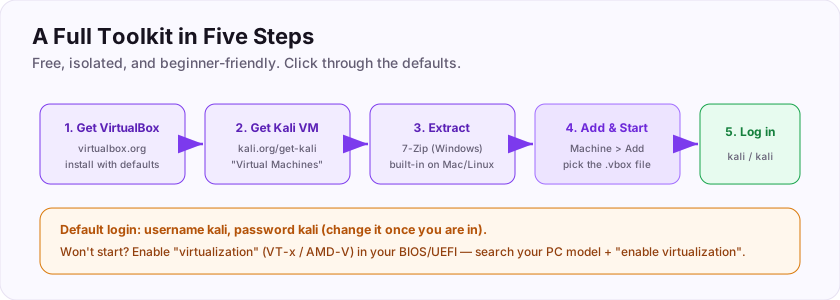
- Go to virtualbox.org, download VirtualBox for your operating system, and install it (click through the installer with the defaults).
- Go to kali.org/get-kali and download the Virtual Machines image built for VirtualBox.
- Extract the downloaded file (use 7-Zip on Windows; Mac and Linux can extract it built-in).
- In VirtualBox choose Machine > Add, select the extracted
.vboxfile, then click Start. - When it boots, log in. You now have a complete hacking lab.
kali and the password kali by default. Change the password once you are in.Once Kali boots, you have earned: ASEC{my_lab_is_ready}
What is the default username for the official Kali Linux VM?
+15 ptsNeed a hint?
The username and password are the same word.What is the flag for this task?
+10 ptsNeed a hint?
It is in bold at the end.What Is Kali Linux?
The hacker's ready-made toolbox
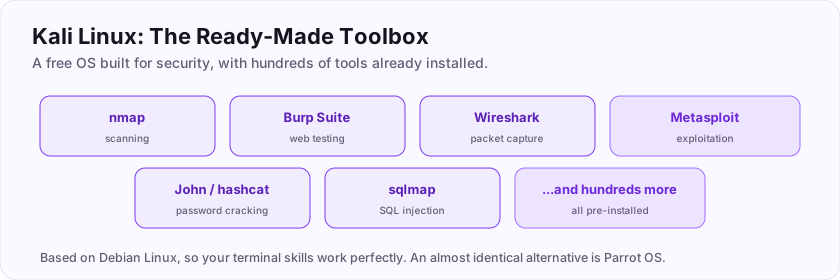
You *could* install security tools one by one, but there is a shortcut the whole industry uses: Kali Linux. It is a free operating system, built specifically for security work, that comes with hundreds of tools already installed and ready.
Inside Kali you will find, pre-loaded:
- Nmap for scanning, Burp Suite for web testing, Wireshark for packet capture.
- Metasploit for exploitation, John and hashcat for password cracking, and many more.
Kali comes with hundreds of security tools already installed, which is why you run it rather than setting everything up by hand. It is based on Debian Linux, so the commands you learn in the terminal room work perfectly here. (An almost identical alternative is Parrot OS — either is fine.)
Flag: ASEC{kali_is_the_toolbox}
Kali comes with hundreds of security tools already ___? (one word)
+10 ptsNeed a hint?
You do not have to set them up by hand.What is the flag for this task?
+10 ptsNeed a hint?
It is in bold at the end.Snapshots: Your Undo Button
Break things fearlessly
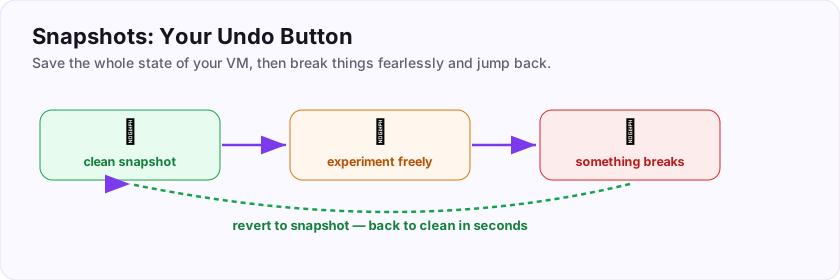
Here is a VirtualBox feature that changes how bravely you can experiment: the snapshot. A snapshot saves the *entire state* of your virtual machine at a moment in time, so you can instantly jump back to it later.
Why it matters:
- Take a snapshot of a clean, working Kali right after setup.
- Experiment freely — install things, run risky tools, even infect it with malware for study.
- If anything breaks, revert to the snapshot and you are back to clean in seconds.
A saved state you can instantly revert your VM to is called a snapshot. It turns "I might break my setup" into "who cares, I'll just revert." This is one of the most freeing tools you have — use it constantly.
Flag: ASEC{snapshot_saves_you}
A saved state you can instantly revert your VM to is called a ___? (one word)
+10 ptsNeed a hint?
Like a photo of the whole machine.What is the flag for this task?
+10 ptsNeed a hint?
It is in bold at the end.Networking Your Lab Safely
Keep the dangerous stuff walled in
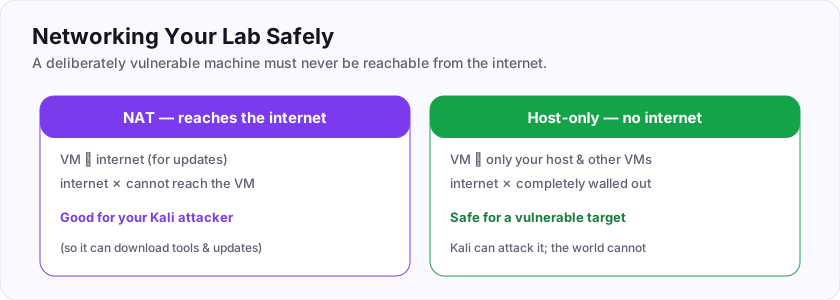
When you add a *vulnerable* practice machine to your lab, you must think about networking, because a deliberately weak machine should never be reachable from the internet — someone else could attack it too.
VirtualBox offers network modes; two matter most:
- NAT — the VM can reach the internet (to download updates) but the outside world cannot reach it. Fine for your Kali attacker.
- Host-only — the VM can *only* talk to your host and other VMs, with no internet at all. This is the safe choice for a vulnerable target: your Kali can attack it, but nobody on the internet can.
To keep a vulnerable machine isolated from the internet, use the host-only network. Put your attacker (Kali) and your vulnerable target on the same host-only network, and you have a private, safe battlefield.
Flag: ASEC{keep_it_isolated}
To keep a deliberately vulnerable machine isolated from the internet, which VirtualBox network mode do you use? (two words)
+10 ptsNeed a hint?
It only talks to your host and other VMs.What is the flag for this task?
+10 ptsNeed a hint?
It is in bold at the end.Adding Vulnerable Targets
Something to actually attack
An attacker machine needs something to attack. Luckily, people have built machines *designed* to be hacked, for exactly this purpose — legal, safe, and endlessly educational.
Great beginner targets:
- OWASP Juice Shop — a modern vulnerable web app, packed with web bugs to find (and made by OWASP).
- DVWA (Damn Vulnerable Web Application) — a classic, adjustable-difficulty web target.
- Metasploitable — a whole vulnerable Linux VM to practise exploitation and privilege escalation.
- VulnHub and hosted platforms — libraries of downloadable or online vulnerable machines.
A famous OWASP-made vulnerable practice app is Juice Shop. Put one of these on your host-only network and point Kali at it — now you can practise everything you learn, entirely legally.
Flag: ASEC{targets_to_attack}
Which deliberately vulnerable web app, made by OWASP, is a famous practice target? (two words)
+10 ptsNeed a hint?
OWASP made it, and it is a drink.What is the flag for this task?
+10 ptsNeed a hint?
It is in bold at the end.Your Lab Is Ready
A complete, free, legal hacking lab
Look at what you have assembled — a real, professional-style practice environment that cost nothing.
Your finished lab:
- VirtualBox as the host software.
- Kali Linux as your attacker, full of tools, on a snapshot you can revert to.
- A vulnerable target (Juice Shop, DVWA, or Metasploitable) on a safe host-only network.
- The habit of taking snapshots before you experiment.
A quick troubleshooting reminder: if a VM will not start, enable virtualization (VT-x/AMD-V) in your BIOS; and log into Kali with username kali. Speaking of which — the default username for the official Kali VM is kali.
Keep everything updated, snapshot often, and you are set to practise for years without ever touching a system you do not own.
Your graduation flag for this room: ASEC{your_lab_is_complete}
What is the default username for the official Kali Linux VM?
+10 ptsNeed a hint?
The username and password are the same word.What is your graduation flag for this room?
+15 ptsNeed a hint?
It is in bold at the very end.Reviews
No written reviews yet. Be the first once you have played the room.