Welcome: How This Platform Works
Two minutes that make everything else easier. No experience needed.
How to Use ASecurity Academy
Welcome, future hacker
You do not need any experience to be here. We will explain every word. Let us start with how the site is laid out.
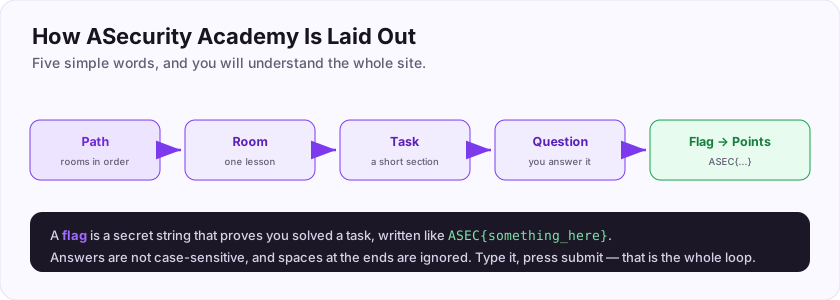
- A room is a single lesson on one topic (like the one you are reading).
- A room is split into tasks — short sections like this one.
- Most tasks end with a question. You answer it to earn points and prove you learned something.
- A group of rooms in a sensible order is called a learning path.
The answer to a question is often a flag: a secret string that proves you solved the task. Flags on this site look like ASEC{something_here}.
Let us try it right now. Your very first flag is: ASEC{welcome_hacker}
Scroll down to the question, type that flag in, and click submit. That is the whole loop you will repeat across the site.
Submit your first flag to see how answering works.
+10 ptsNeed a hint?
It is written in bold just above the question.Your Learning Journey
What order should I do things in?
You could wander freely, but here is a friendly route from zero to job-ready:
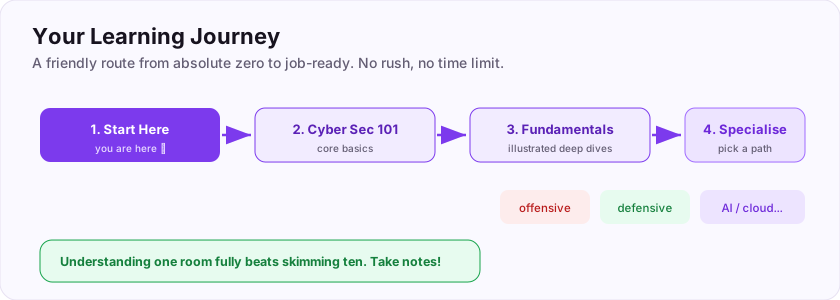
- Finish this Start Here path (you are in it now).
- Do the Cyber Security 101 path for the core basics.
- Do Fundamentals In Depth for illustrated deep dives.
- Then pick a direction you enjoy — offensive, defensive, AI, cloud, game hacking, or a field specialism.
There is no time limit and nothing to break. Curiosity is the only requirement.
What do we call the secret string you submit to prove you solved a task? (one word)
+10 ptsNeed a hint?
It looks like ASEC{...}.What Is Cybersecurity, Really?
Protecting the digital world
Before diving into hacking, let us be clear on what the whole field is *for*. Cybersecurity is simply the practice of protecting systems, networks, and data from digital attacks — phishing, malware, data theft, break-ins, and more.
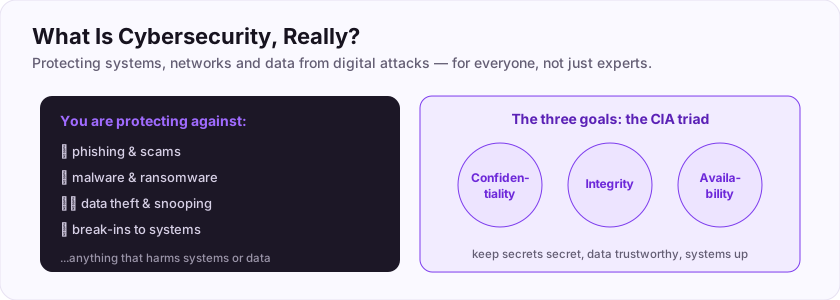
Security people often summarise the *goals* with three letters: the CIA triad.
- Confidentiality — keep secrets secret (only the right people see the data).
- Integrity — keep data trustworthy (nobody tampered with it).
- Availability — keep systems up and working when needed.
Cybersecurity protects systems and data from digital attacks. Every technique you will learn — attacking or defending — ultimately serves one of those three goals. And it matters for *everyone*, from huge companies to your own phone.
Flag: ASEC{security_is_for_everyone}
Cybersecurity protects systems, networks and data from digital ___? (one word)
+10 ptsNeed a hint?
Phishing, malware, break-ins...What is the flag for this task?
+10 ptsNeed a hint?
It is in bold at the end.Red, Blue, and Purple Teams
Which side will you play?
Security has two great traditions, and you will taste both on this site.
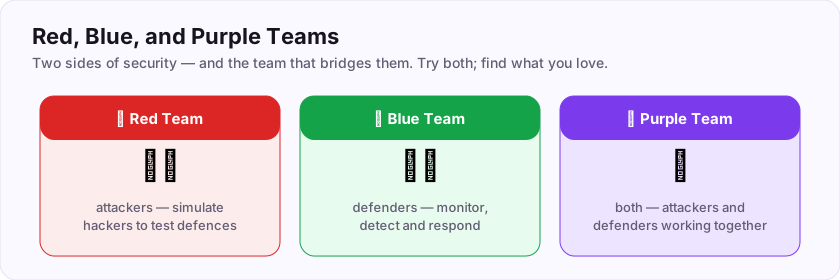
- Red team (offensive) — the attackers. They think like hackers and *simulate* attacks to find weaknesses before real criminals do. Penetration testing lives here. The team that simulates hackers to test defences is the red team.
- Blue team (defensive) — the defenders. They monitor, detect, and respond to attacks, running the SOC and incident response.
- Purple team — not really a third team, but the *cooperation* of red and blue, so attackers' findings directly improve the defenders' detection.
Most people lean toward one side, but the best understand both. You do not have to choose now — try everything and follow what excites you.
Flag: ASEC{pick_your_side}
Attackers who test defences by simulating hackers are the ___ team? (one word)
+10 ptsNeed a hint?
The offensive colour.What is the flag for this task?
+10 ptsNeed a hint?
It is in bold at the end.Flags, Points, and Progress
The game that keeps you going
Learning security here is built like a game, because motivation matters. You already met the core loop; here is how progress adds up.
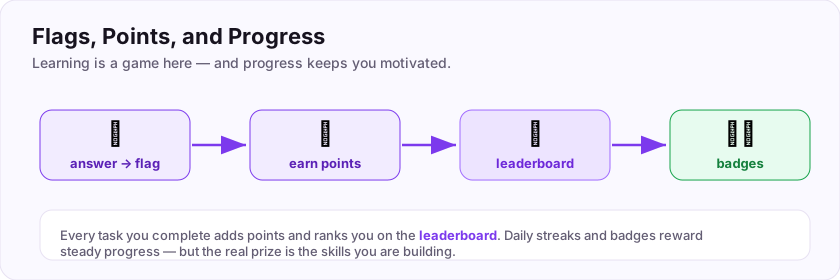
- Answer a question correctly, and you capture a flag and earn points.
- Your points rank you on the leaderboard against other learners.
- Keep a daily streak and unlock badges for milestones.
- Finish a whole path and you can earn a certificate.
Completing tasks earns points, which rank you on the leaderboard. None of this is the real goal, though — it is scaffolding to keep you coming back. The true reward is the skill quietly building in your head with every room.
Flag: ASEC{climb_the_ranks}
Completing tasks earns you points, which rank you on the ___? (one word)
+10 ptsNeed a hint?
Where you see your rank versus others.What is the flag for this task?
+10 ptsNeed a hint?
It is in bold at the end.How to Actually Learn This
Do it, do not just watch it
Here is the single most important study tip in all of security: you learn by doing, not by passively watching. Reading about a lock will never teach you to pick one.
Habits that separate people who make it from people who stall:
- Type the commands yourself. Do not copy-paste blindly — feel them.
- Take notes in your own words. Every professional keeps a notebook.
- Struggle a little before checking the hint. The struggle is where learning happens.
- Repeat and revisit. Skills fade without practice; come back to rooms.
- Be patient and consistent. Twenty minutes a day beats a rare marathon.
Is the best way to learn security by doing it hands-on? Yes — without question. This whole platform is built to let you *do*, safely and legally.
Flag: ASEC{learn_by_doing}
Is the best way to learn security by doing it hands-on, rather than just reading? (yes/no)
+10 ptsNeed a hint?
Reading about a lock will not teach you to pick one.What is the flag for this task?
+10 ptsNeed a hint?
It is in bold at the end.Where You'll Practice
A safe place to get your hands dirty
"Learn by doing" raises a question: *where* do you practise safely and legally? You never touch systems you do not own. Instead, you build your own playground.
Over the next rooms in this Start Here path, you will set up a free practice lab on your own computer — typically:
- VirtualBox (free) to run virtual machines safely isolated from your real system.
- Kali Linux — a free operating system packed with security tools — as your attacker machine.
- Deliberately vulnerable practice targets to attack legally.
In the next rooms you set up a free practice lab on your own machine. Add public CTFs and this platform's guided walkthroughs, and you have everything you need to practise for years — all legal, all safe.
Flag: ASEC{build_your_lab}
In the next rooms, you set up a free practice ___ on your own computer? (one word)
+10 ptsNeed a hint?
A safe playground to practise in.What is the flag for this task?
+10 ptsNeed a hint?
It is in bold at the end.Ready to Begin
You have everything you need to start
That is the whole orientation. Look how much you already understand.
- The site is paths → rooms → tasks → questions → flags → points.
- Cybersecurity protects systems and data, guided by the CIA triad.
- There are red (attack), blue (defend), and purple teams — you can try all.
- You learn by doing, in your own free lab, and progress shows up as points and badges.
- The recommended route is Start Here → Cyber Security 101 → Fundamentals In Depth → specialise.
Every flag on this site is wrapped in the prefix ASEC, so you can always spot one. You are ready. The only requirement from here is curiosity — so keep going, one room at a time.
Your graduation flag for this room: ASEC{you_are_ready}
Every flag on this site is wrapped in which four-letter prefix?
+10 ptsNeed a hint?
Look at any flag: ASEC{...}.What is your graduation flag for this room?
+15 ptsNeed a hint?
It is in bold at the very end.Reviews
No written reviews yet. Be the first once you have played the room.