Windows Fundamentals
Most corporate networks run on Windows, so you cannot avoid it. This room covers the command prompt, PowerShell, and where Windows keeps its configuration.
Why Windows Matters
The OS you cannot avoid
Linux may be the hacker's playground, but out in the real world, Windows runs almost everything: office desktops, corporate servers, and the networks that tie them together. If you want to test or defend real organisations, you will meet Windows on nearly every engagement — so it pays to be comfortable here too.
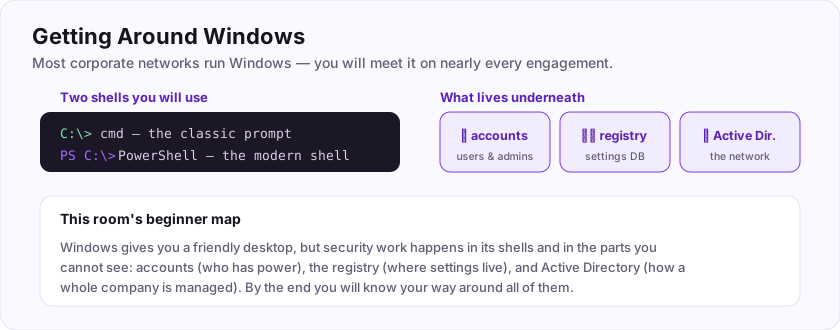
Windows gives you a friendly graphical desktop, but for security work you will reach for its two text shells:
- Command Prompt (cmd) — the classic, simple command interpreter.
- PowerShell — the modern, powerful one built for automation.
And underneath the pretty windows sit the parts attackers and defenders care about: user accounts, the registry (its settings database), and, on corporate networks, Active Directory.
This room gives you the beginner's map of all of them.
Flag: ASEC{windows_is_everywhere}
Most corporate networks run on which operating system? (one word)
+10 ptsNeed a hint?
The one with the Start menu.What is the flag for this task?
+10 ptsNeed a hint?
It is in bold at the end.The command prompt
Same idea as Linux, different words
Windows ships with a classic command interpreter called cmd (Command Prompt). It works like the Linux terminal, but many commands have different names.
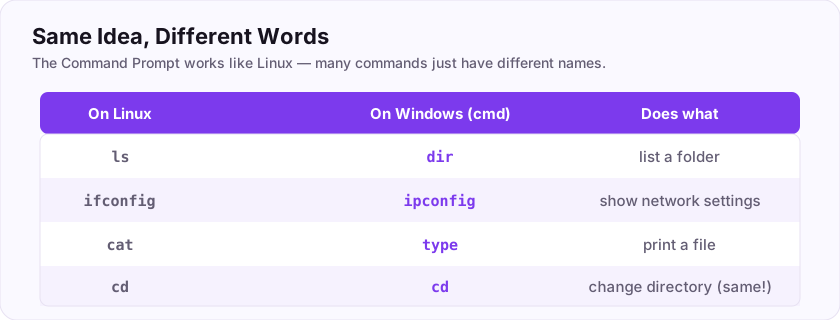
A quick translation for a few you already know:
- List a directory: Linux
lsbecomes Windowsdir. - Show network settings: Linux
ifconfigbecomes Windowsipconfig. - Change directory:
cd(the same on both).
C:\Users\alice> dir
C:\Users\alice> ipconfig
   IPv4 Address. . . : 192.168.1.42
So in Windows CMD, dir lists a directory and ipconfig shows your IP configuration. Knowing this little map lets you move around a Windows box straight away.
dir (not ls) to list files and ipconfig (not ifconfig) for network settings.Which command lists directory contents in Windows CMD?
+10 ptsNeed a hint?
Three letters.Which command shows your IP configuration on Windows?
+10 ptsNeed a hint?
Like ifconfig, but the Windows spelling.PowerShell power
The modern, powerful shell
Beyond cmd, Windows has PowerShell — a far more capable, modern shell built for automation. Its commands are called cmdlets, and they follow a tidy Verb-Noun pattern that makes them easy to guess.
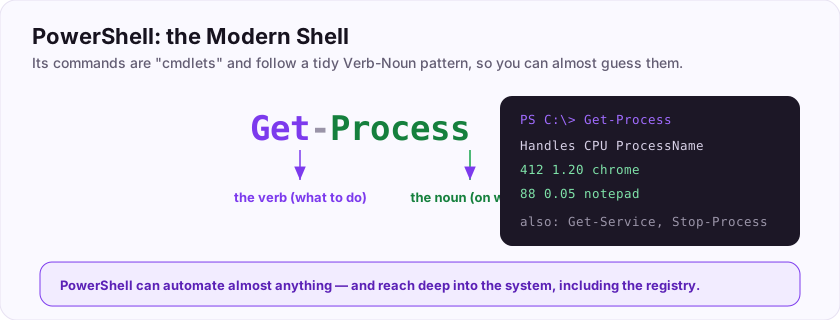
For example, to list running processes you use the cmdlet Get-Process — the verb *Get*, the noun *Process*. Others follow the same shape: Get-Service, Stop-Process, Get-Content.
PS C:\> Get-Process
Handles  CPU   ProcessName
    412  1.20  chrome
     88  0.05  notepad
PowerShell is also how you reach deep into the system, including the registry, the hierarchical database where Windows stores most of its settings (you will explore it next).
The cmdlet that lists running processes is Get-Process, and the settings database is the registry.
Which PowerShell cmdlet lists running processes?
+15 ptsNeed a hint?
Verb-Noun. The verb is Get.What is the name of the Windows configuration database?
+10 ptsNeed a hint?
Editable with regedit.Windows Users and Accounts
Who is who on a Windows box
Like Linux, Windows is multi-user, and understanding accounts is central to security.
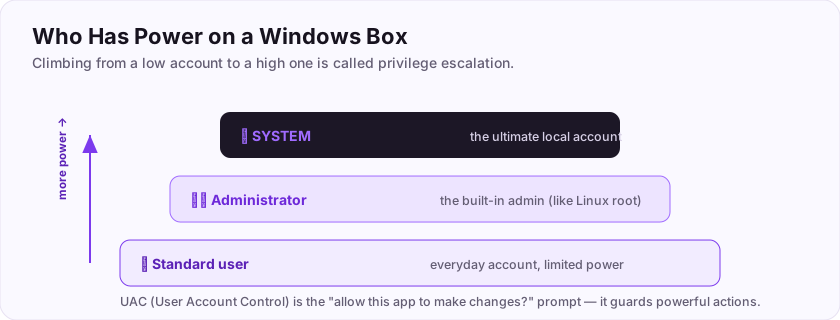
- Standard users — everyday accounts with limited power.
- Administrator — the built-in, all-powerful admin account, Windows' equivalent of Linux's root. It can change anything on the machine.
- SYSTEM — an even higher, behind-the-scenes account used by the operating system itself. On a single machine, SYSTEM is the ultimate prize.
There is also UAC (User Account Control) — the "Do you want to allow this app to make changes?" pop-up — which stops even admins from running powerful actions without confirming.
The built-in all-powerful admin account is Administrator. Just as with Linux, the attacker's goal is often to climb from a standard user up to Administrator or SYSTEM.
Flag: ASEC{know_your_accounts}
What is the name of the built-in, all-powerful Windows admin account? (one word)
+10 ptsNeed a hint?
Windows' equivalent of Linux root.What is the flag for this task?
+10 ptsNeed a hint?
It is in bold at the end.The Registry: Windows' Settings Database
Where Windows keeps its brain
Linux scatters configuration across text files in /etc. Windows does it differently: almost every setting lives in one giant, hierarchical database called the registry.
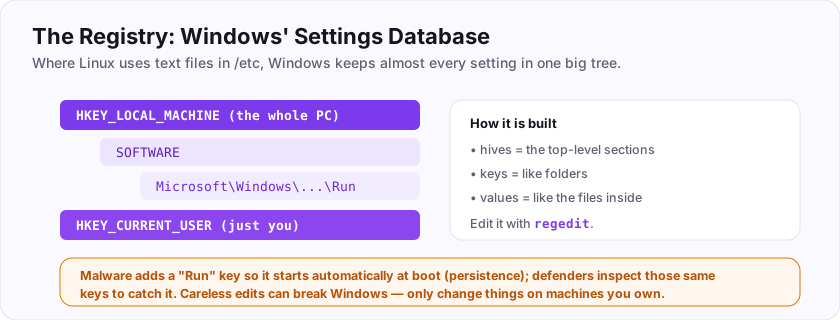
The registry is organised into top-level hives (like HKEY_LOCAL_MACHINE for the whole computer and HKEY_CURRENT_USER for you), then keys and values beneath them — much like folders and files. You browse and edit it with the built-in tool regedit.
Why it matters in security
- Attackers use the registry to hide, adding "Run keys" so their malware starts automatically at boot (a persistence trick).
- Defenders and forensics analysts inspect those same keys to spot compromise.
The tool that edits the registry is regedit.
Flag: ASEC{the_registry_holds_all}
Which built-in tool edits the Windows registry? (one word)
+10 ptsNeed a hint?
Registry editor.What is the flag for this task?
+10 ptsNeed a hint?
It is in bold at the end.Active Directory in One Minute
How companies manage thousands of machines
On a home PC, accounts live on that one computer. But a company with thousands of employees cannot manage each machine separately — so Windows networks use Active Directory (AD), a central system that manages all the users, computers, and permissions from one place.
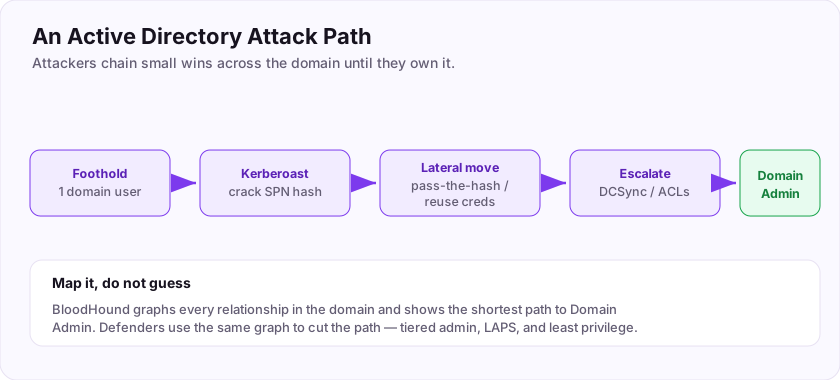
- A domain is the group of machines and users managed together.
- A Domain Controller (DC) is the server that holds the directory and checks logins.
- Logging into your work laptop actually checks your password against the DC.
Why it is the crown jewel
Because AD controls *everything*, compromising it can mean owning the entire organisation. The top prize is Domain Admin. That is why there is a whole advanced room dedicated to attacking and defending AD — for now, just know what it is.
The central system that manages users and computers across a Windows network is Active Directory.
Flag: ASEC{ad_is_the_kingdom}
What is the name of Microsoft's system for managing users and computers across a Windows network? (two words)
+10 ptsNeed a hint?
AD for short.What is the flag for this task?
+10 ptsNeed a hint?
It is in bold at the end.Watching the System: Processes, Services, Logs
Seeing what a Windows machine is doing
Whether you are hunting malware or just understanding a box, Windows gives you built-in tools to watch it.
- Task Manager (Ctrl+Shift+Esc) — a quick view of running programs and processes.
Get-Processis its command-line cousin. - Services — background programs that run without a window; many attacks abuse a service to survive reboots.
- Event Viewer — Windows' logbook. It records system and security events (logins, errors, changes). For a defender, it is the first place to look after something suspicious.
The built-in tool that shows logs of system and security events is the Event Viewer.
Flag: ASEC{watch_the_system}
Which built-in Windows tool shows logs of system and security events? (two words)
+10 ptsNeed a hint?
It views events.What is the flag for this task?
+10 ptsNeed a hint?
It is in bold at the end.Putting It All Together
Your Windows starter map
You now have the beginner's map of Windows for security work.
- Two shells:
cmdfor the classics (dir,ipconfig) and PowerShell for power (Verb-Noun cmdlets likeGet-Process). - Accounts: standard users, the built-in Administrator, and the even higher SYSTEM — climbing between them is privilege escalation.
- The registry: Windows' settings database, edited with
regedit, and a favourite hiding spot for malware. - Active Directory: the central brain of a corporate Windows network, and its ultimate target.
- Watching it: Task Manager, services, and the Event Viewer log.
Between this room and the Linux one, you can now find your way around either operating system you will meet on a real engagement — which is exactly where security work happens. The modern Windows shell you will lean on most is PowerShell.
Your graduation flag for this room: ASEC{you_understand_windows}
The modern, object-oriented Windows shell is called ___? (one word)
+10 ptsNeed a hint?
Its cmdlets are Verb-Noun.What is your graduation flag for this room?
+15 ptsNeed a hint?
It is in bold at the very end.Deep Dive & Field Practice
Windows on the attacker's terms
Windows is the enterprise, so you must be comfortable in it. Learn the file system layout, the registry, services, and above all accounts and privileges — whoami /priv is where many attacks begin.
Understanding local admin versus SYSTEM, and how services run, is the groundwork for both privilege escalation and defence. Get fluent with PowerShell too; it is the modern Windows admin (and attacker) language.
The flag: ASEC{know_your_privileges}
Which command lists your current Windows privileges?
+10 ptsNeed a hint?
whoami with a switch.What is the flag?
+10 ptsNeed a hint?
Read the last line.Job-Ready Notes
Job-Ready Notes
Tools to know: PowerShell, winPEAS, BloodHound, Sysinternals (and Mimikatz in a lab).
Cheat sheet
whoami /priv                                  # list token privileges
Get-Service | ? {$_.Status -eq 'Running'}     # running services
Interview practice
- What is the difference between Administrator and SYSTEM?
- Explain Kerberoasting in one sentence.
- How does a pass-the-hash attack work?
Reviews
No written reviews yet. Be the first once you have played the room.