How HTTP Works
Almost every web attack is really a message sent to a server that the server trusted too much. Before you can break anything, you need to read those messages fluently. This exercise walks through one real HTTP request and response line by line, then hands you the vocabulary you will use in every other exercise on the platform.
What you will learn
- Read an HTTP request and response and name every part
- Explain what GET, POST, PUT and DELETE are for
- Read a status code and know what the server is telling you
- Explain why the browser is attacker-controlled and the server is the only safe side
1 A conversation, not a page
When you open a web page, it feels like one solid thing arrives. It does not. Your browser and the server are holding a rapid back-and-forth conversation in a language called HTTP — the Hypertext Transfer Protocol. The browser sends a short text message called a request, and the server sends a short text message back called a response. A single page might involve dozens of these exchanges: one for the HTML, one for each image, one for the stylesheet, and so on.
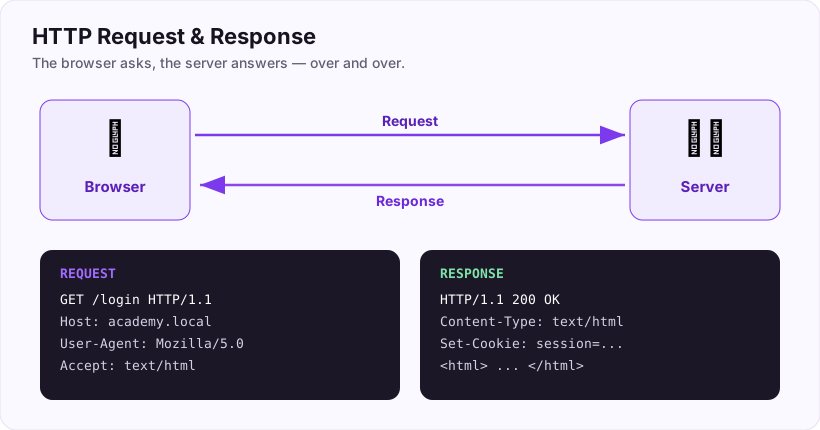
The single most important thing to hold onto is this: both messages are just text. There is nothing magic or sealed about them. Anything your browser sends, you can read and change. That simple fact is the soil every web vulnerability grows in, so we will keep coming back to it.
Think of HTTP like ordering at a counter. You say what you want (the request). The person behind the counter either hands it over, tells you it is not here, or says the kitchen is on fire (the response). Each order is its own exchange — the counter does not remember you from one order to the next unless you give it something to remember you by. We will get to that "something" later.
2 Reading a request
Here is a real request, the kind your browser sends when you visit a login page. Read it top to bottom.
GET /login HTTP/1.1
Host: academy.example.com
User-Agent: Mozilla/5.0
Accept: text/html
Cookie: session=8f3b2c...
Let us take it apart:
GETis the method — the verb. It says *what you want to do*.GETmeans "fetch this, I am only reading."/loginis the path — *which* thing on the server you want.HTTP/1.1is just the version of the protocol being spoken.- Everything after the first line is a list of headers — one
Name: valuepair per line. Headers are extra notes about the request.Hostsays which site,User-Agentnames your browser,Acceptsays what kind of content you can handle, andCookiecarries the little token that proves who you are.
That is the whole shape: a first line with a method and a path, then headers. A POST request (used for sending data, like a filled-in form) adds one more part — a body below the headers, holding the actual form fields.
Every header on that list was written by the browser, which means every header can be rewritten by someone using a tool instead of a browser. Hold that thought.
3 Methods: the verbs
The method is the verb of the request. You will meet four of them constantly.
| Method | What it means | Everyday example |
|---|---|---|
| GET | read / fetch something | opening a page |
| POST | send / create something | submitting a login form |
| PUT | update / replace something | editing your profile |
| DELETE | remove something | deleting a post |
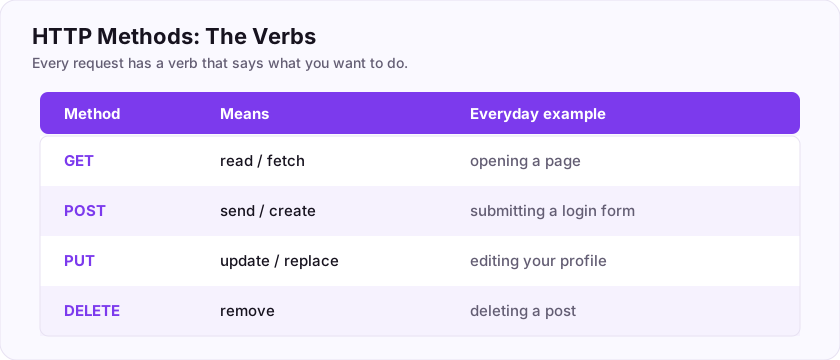
Here is a habit worth building now: when you test an application, notice which verb each action uses. A GET is supposed to be a safe read that changes nothing. If you ever find that a GET request *deletes* an account or *transfers* money, that is a design smell worth chasing — it means the application is doing something dangerous with a verb that was meant to be harmless, and attackers can often trigger it just by getting you to click a link.
4 Status codes: the server replies
The server answers with a status code — a three-digit number that summarises what happened. You do not need to memorise all of them. You need the first digit, which tells you the whole story.
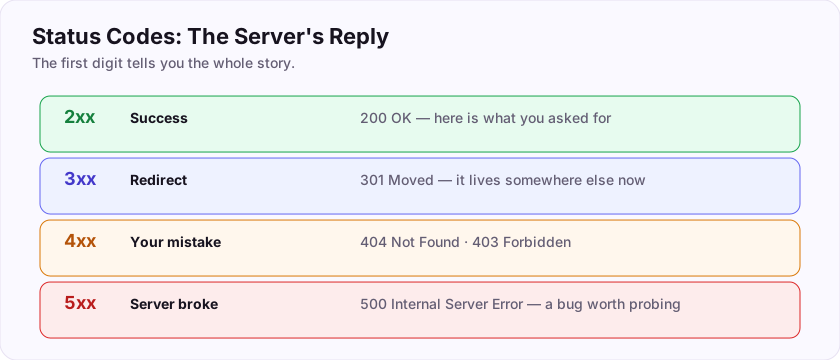
- 2xx — success.
200 OKis the happy path: here is what you asked for. - 3xx — redirect.
301/302: what you want lives somewhere else, go there instead. - 4xx — you got it wrong.
404 Not Found,403 Forbidden,401 Unauthorized. The request was yours to fix. - 5xx — the server got it wrong.
500 Internal Server Errorusually means the code crashed. For a tester this is gold: a crash often means your input reached somewhere it was not expected, and that is exactly where bugs hide.
So a quick read: 4xx means "try something different," while 5xx means "you may have just found something — poke harder."
5 The browser is the attacker's side
Now the idea that makes the rest of security click into place.
The conversation has two sides. One side runs on the user's machine — the browser. The other runs on the company's machine — the server. The user controls their whole side completely.
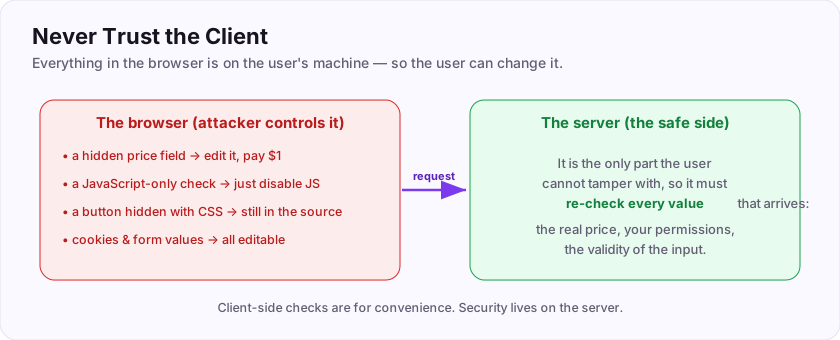
People find this surprising at first, so let us be concrete. On the browser side, an attacker can:
- change a hidden form field (that
price=4999field? set it toprice=1); - switch off JavaScript, so any check written only in JavaScript simply never runs;
- see every "hidden" button and link, because hiding something with CSS still leaves it in the page source;
- edit cookies and headers before they are sent.
None of that is exotic hacking. It is a normal person with a free browser tool, changing text before it is sent.
The lesson is not "lock down the browser" — you cannot, it is not your machine. The lesson is the opposite: nothing the browser sends can be trusted, so every check that actually matters has to happen on the server. The server is the one part of the conversation the user cannot tamper with. A validation that lives only in the browser is a suggestion; a validation on the server is a rule.
When you can read a request, name its method, read a status code, and explain why the browser cannot be trusted, you are ready to start finding real bugs. Submit the keys below to log your progress.
Submit your keys
Keys are not case-sensitive. Each is worth points the first time you get it right.
Key 1Which HTTP method is meant only to read data, without changing anything on the server?
+20 ptsShow a hint
It is the verb your browser uses just to open a page.A written solution is included with Pro, or appears here once you solve it.