Where Web Bugs Come From
You could memorise a hundred named vulnerabilities, or you could learn the one mistake that produces most of them. This exercise teaches the second way. We follow a single piece of user input from the browser into the server and watch the exact moment a trusting application turns that input into a bug.
What you will learn
- Trace a piece of input from the browser to the server
- Name the three places input turns dangerous: a query, a page, and an id
- Explain the difference between validating input and encoding output
- Recognise the trust mistake behind most of the OWASP Top 10
Before you start
These exercises cover what this one builds on.
- How HTTP Works Easy
1 The one mistake
Here is a claim, and the rest of this exercise is the evidence for it:
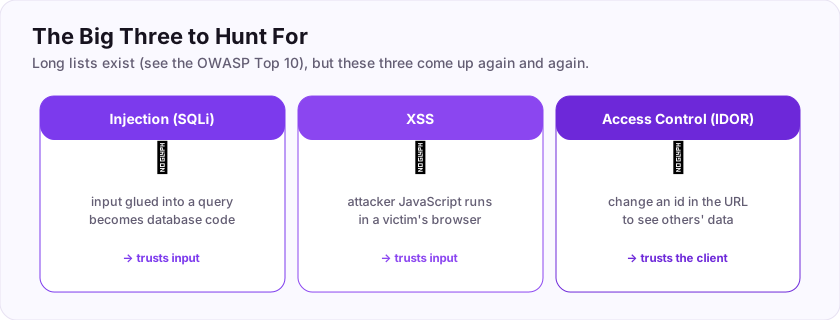
If you learn the named bugs first — SQL injection, XSS, IDOR — they can feel like a list of unrelated tricks to memorise. They are not. They are three places the *same* trust mistake shows up:
- trust input inside a database query, and you get SQL injection;
- trust input inside a web page, and you get cross-site scripting;
- trust an id the user can change, and you get broken access control.
Learn the pattern once and the named bugs stop being a list to memorise and become things you can predict. When you look at a new feature you will start asking, almost automatically: *where does user input go, and does the app trust it when it gets there?*
2 Follow one piece of input
Let us make it concrete. You type your name into a form and submit. Watch where that text goes.
You type:      alice
Browser sends: POST /profile  body: name=alice
Server reads:  $name = the "name" field = "alice"
Server uses $name in three places:
   1. saves it:     ...WHERE name = 'alice'      (a database query)
   2. shows it:     <h1>Hello, alice</h1>         (a web page)
   3. checks it:    is 'alice' allowed here?       (a decision)
Nothing is wrong yet, because alice is an ordinary name. The danger appears when you stop sending an ordinary name and start sending text designed to *mean something* in one of those three places.
What if your "name" were ' OR '1'='1? In place 1 that is no longer a name — it is a fragment of database logic. What if it were <script>...</script>? In place 2 that is no longer text to show — it is code for the browser to run. The input did not change the application's code; it changed what the application's code *does*, because the application pasted a stranger's words into a sentence where words have power.
3 Data that turns into code
The heart of it is a confusion between data and code.
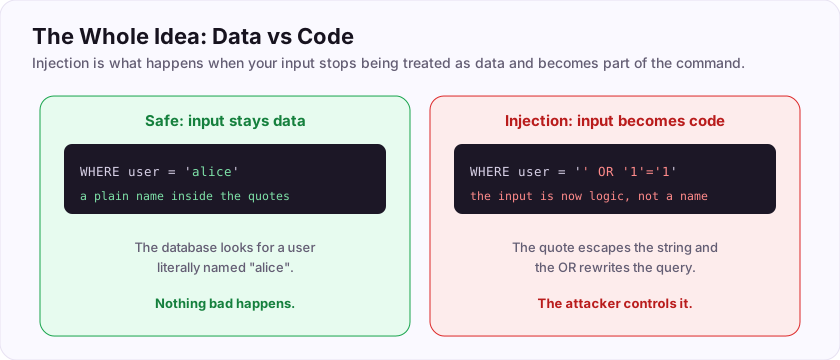
When the server builds a database query by gluing your name directly into a sentence —
"SELECT * FROM users WHERE name = '" . $name . "'"— it is treating your text as part of the *sentence*. If your text contains the characters that have special meaning in that sentence (a quote, say), you can break out of the "just a value" part and into the "instructions" part. Your data has become code.
The same confusion in a web page: if the server writes your text straight into the HTML, and your text contains <script>, the browser cannot tell your script from the site's own scripts. Again, data became code.
So the fix, in the abstract, is always the same shape: keep the user's data in the box marked "data," and never let it leak into the box marked "code." Every real defence you will learn is a specific way of enforcing that one boundary.
4 Two defences, two moments
There are two moments where you can enforce the boundary, and good applications use both.
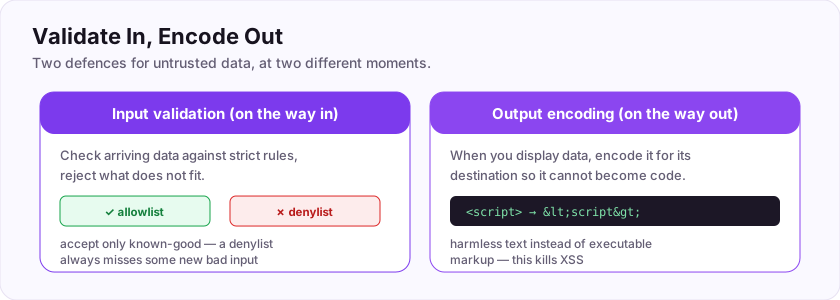
Validate on the way in. When data arrives, check it against strict rules and reject what does not fit. The important word is *allowlist*: say what is allowed (a date looks like YYYY-MM-DD, an age is a number from 0 to 120) and refuse everything else. The opposite, a *denylist* that tries to name every bad thing, always misses something — there is always one more trick you did not think of.
Encode on the way out. When you send data somewhere — into a page, into a query — package it so it cannot be mistaken for code in that destination. Encoding for HTML turns <script> into harmless visible text. Using a parameterised query (you will meet these in the SQL injection exercise) keeps your value firmly in the "data" box no matter what characters it contains.
Validation reduces the garbage that gets in. Encoding makes sure whatever did get in stays harmless when it comes back out. Neither alone is enough; together they close the boundary from both sides.
5 Why the same bug keeps happening
If the mistake is so simple, why is it everywhere, decade after decade?
Because the trusting version is the *easy* version. Gluing a name into a query is one short line a tired developer writes without thinking. Doing it safely takes a deliberate habit. Frameworks have gotten much better at making the safe way the default, which is real progress — but the moment someone steps outside the framework to write "just one quick query," the old mistake is right there waiting.
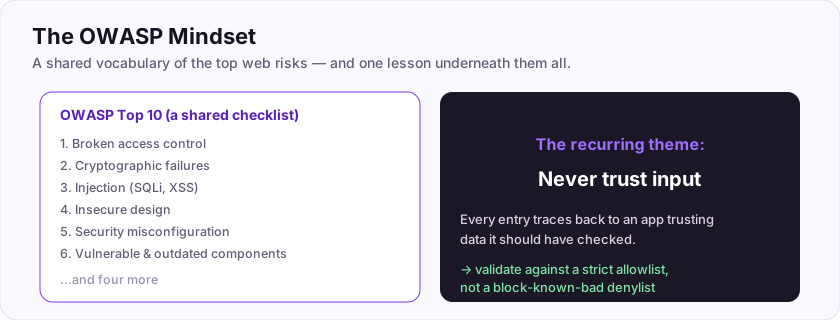
This is also why the OWASP Top 10 — the industry's shared list of the most common web risks — reads, once you know the pattern, like variations on a theme. Injection, broken access control, insecure design: trace each one back and you find an application trusting data it should have checked.
So here is the mindset to carry into every other exercise: you are not hunting for a hundred different bugs. You are hunting for one bug in a hundred different costumes — a place where the app trusts input. Find where input goes; ask what it could pretend to be when it gets there. That is the whole game.
Submit your keys
Keys are not case-sensitive. Each is worth points the first time you get it right.
Key 1In one word, what is the underlying mistake behind SQL injection, XSS and broken access control alike? The application did this to user input when it should not have.
+25 ptsShow a hint
It is the opposite of "check" or "verify". The app ___ed the input. ("trusted" is fine too.)A written solution is included with Pro, or appears here once you solve it.
Key 2There are two defences: one checks data as it arrives, the other packages data safely as it leaves. The second one — making data harmless for its destination — is called output what?
+25 ptsShow a hint
Turning <script> into harmless visible text is output ___. ("encode" is accepted.)A written solution is included with Pro, or appears here once you solve it.