SQL Injection
SQL injection is the textbook example of input turning into code, and it is still found in real applications every year. In this exercise you will read the vulnerable query, understand exactly why a quote character breaks it, walk through the login-bypass payload step by step, and then learn why prepared statements — not blocklists — are the real cure.
What you will learn
- Explain how a SQL query is built and where user input lands
- Explain why a single quote is the character that breaks the query
- Walk through a login-bypass payload and say what each part does
- Explain why prepared statements fix injection and blocklists do not
Before you start
These exercises cover what this one builds on.
- How HTTP Works Easy
- Where Web Bugs Come From Easy
1 What the database is for
Behind most web applications sits a database — an organised store of the application's data. User accounts, posts, orders: all of it lives in tables, which are just grids. A users table might look like this:
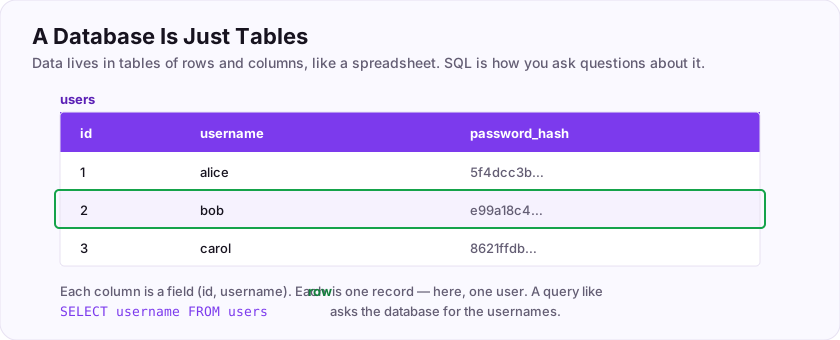
The application talks to the database in a language called SQL (Structured Query Language). SQL reads a lot like English. To find a user you would write:
SELECT * FROM users WHERE name = 'alice'"Select all columns from the users table where the name is alice." The database runs that sentence and hands back the matching row. Simple and powerful — and the power is exactly the problem, because if an attacker can influence that sentence, they can make the database do things the developer never intended.
2 How the bug is born
Here is how a careless login builds its query. The developer takes the username and password from the form and glues them straight into the SQL:
$sql = "SELECT * FROM users
        WHERE name = '" . $username . "'
        AND pass = '" . $password . "'";
If you log in as alice with password secret, the finished sentence is exactly what you would hope:
SELECT * FROM users WHERE name = 'alice' AND pass = 'secret'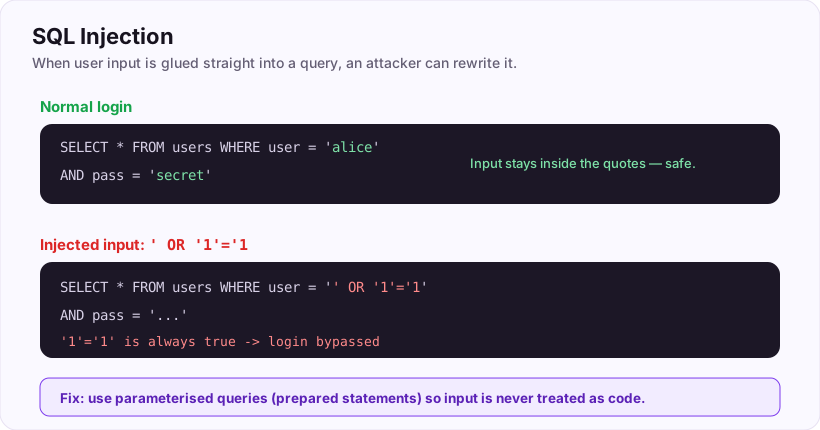
Notice *where* your input sits: inside the single quotes. As long as it stays inside those quotes, it is just a value — data. The quotes are the walls of the "data" box. The whole attack is about climbing over that wall.
3 The quote that breaks everything
What happens if your username is not a name at all, but contains a single quote?
Say you type alice' into the username box. The server glues it in and the sentence becomes:
SELECT * FROM users WHERE name = 'alice'' AND pass = '...'That stray quote lands in the middle of the sentence and the database can no longer make sense of it — you will usually get a database error, often surfaced as a 500 status. That error is the discovery moment. A single quote breaking the page is the classic sign that your input is reaching the query unescaped — that the "data" box has a hole in its wall.
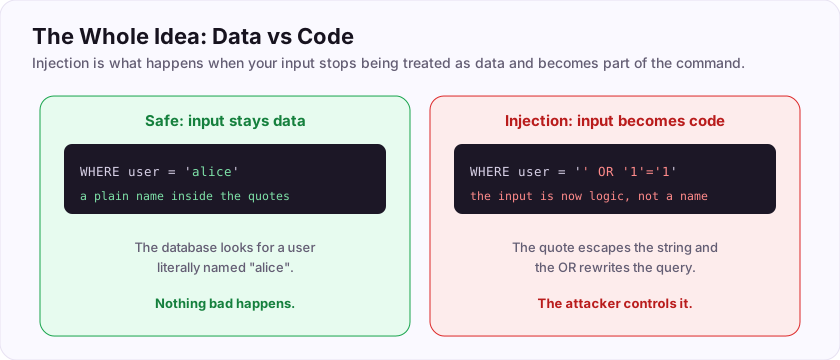
Pentesters call this first step "putting a quote in to see if it breaks." If it breaks, the input is not being kept safely inside its box, and you can probably rewrite the sentence. If it does not break, the application may be handling input properly — good for them, on to the next input for you.
4 Bypassing the login
Now we weaponise that hole. We will not just break the sentence — we will rewrite it so it always says "yes." Put this in the username box:
' OR '1'='1Glue it into the query and read the result carefully:
SELECT * FROM users WHERE name = '' OR '1'='1' AND pass = '...'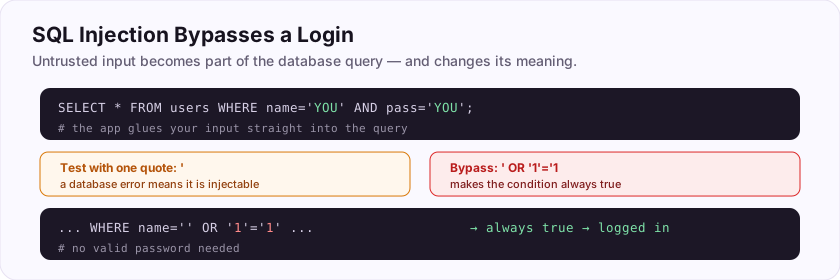
Take it piece by piece:
- The opening
'closes the empty name value early — we have climbed out of the data box. OR '1'='1'adds a condition of our own.'1'='1'is always true. "Name is empty OR one equals one" — and one always equals one, so the whole condition is true for every row.- The database happily returns a user, the application sees a returned row, thinks "credentials matched," and logs us in. We never knew a password.
That is login bypass: you did not guess a secret, you changed the question so the answer no longer depended on the secret. This is the canonical SQL injection, and understanding every character of it is worth more than memorising fifty payloads.
5 The real fix: prepared statements
A beginner's instinct is to ban the quote character — strip out apostrophes, block the word OR. This is a blocklist, and it is a trap. Attackers have endless ways around it: different quoting, comments inside keywords, encoded characters, entirely different payloads for data that is a number rather than a string. You will always miss one. Trying to name every bad input is a game you lose eventually.
The real fix removes the whole class of bug. It is called a prepared statement (or parameterised query).
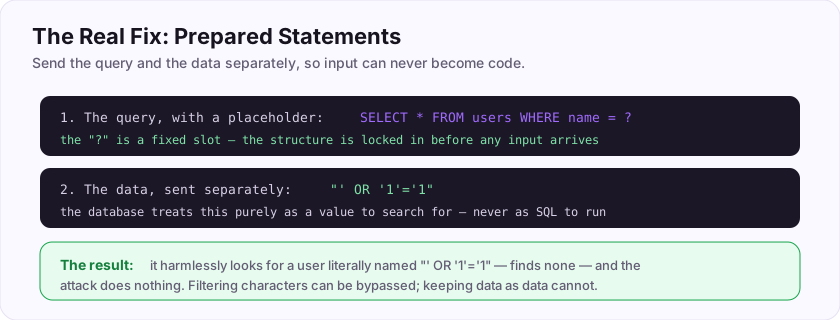
The idea is beautifully simple: send the sentence and the values to the database separately. First you send the query with a placeholder where the value goes:
SELECT * FROM users WHERE name = ?Then you send the value — ' OR '1'='1 — as a *separate* parcel. Because the database received the sentence *first*, its structure is already locked in. The value arrives afterwards and can only ever fill the placeholder as data. There is no way for it to become part of the sentence, no matter what characters it contains. The data/code boundary is enforced by the database itself, not by you trying to sanitise cleverly.
In PHP with PDO that looks like:
$stmt = $pdo->prepare('SELECT * FROM users WHERE name = ?');
$stmt->execute([$username]);
Every mainstream language has the same tool. Use it for every query that touches user input, and SQL injection simply cannot happen there.
Submit the keys below to log this exercise.
Submit your keys
Keys are not case-sensitive. Each is worth points the first time you get it right.
Key 1Which single character, typed into a vulnerable field, classically breaks a SQL query and reveals that your input is reaching it unescaped?
+25 ptsShow a hint
It is the single quote — the character that walls off a string value in SQL. Type just that one character.A written solution is included with Pro, or appears here once you solve it.
Key 2What is the name of the defence that sends the query and the user-supplied values to the database separately, so input can never become part of the SQL? (Two words.)
+25 ptsShow a hint
Also called a parameterised query. The query has a ? placeholder. ("prepared statement" singular is fine.)A written solution is included with Pro, or appears here once you solve it.