Offline Lab: See & Edit Real Requests (Intercepting Proxy)
The HTTP exercise said the browser is the attacker's side and every request is just editable text. This offline lab makes that concrete: you put an intercepting proxy between your browser and the web, and you see every request, pause it, and change it before it is sent. Once you have felt this, client-side 'security' never fools you again.
What you will learn
- Install a local intercepting proxy (Burp Suite Community or OWASP ZAP)
- Route your browser's traffic through it
- Watch the real HTTP requests and responses behind a page
- Pause a request and edit it before it reaches the server
Before you start
These exercises cover what this one builds on.
- How HTTP Works Easy
Offline lab — set up on your own machine
This lab runs locally, not on our servers. Follow the set-up below, attack the target on your own machine, then submit the keys here. Only practise against targets you have set up yourself.
You need one free intercepting proxy. Either of these is fine — both are free and run locally:
- OWASP ZAP (fully free, open source): download from zaproxy.org/download.
- Burp Suite Community Edition (free tier): download from portswigger.net/burp/communitydownload.
Set-up outline (ZAP shown; Burp is very similar):
1. Install and launch ZAP.
2. ZAP runs a proxy on 127.0.0.1:8080 by default.
3. Point your browser at that proxy. The easiest way is ZAP's built-in
   browser: Quick Start → "Manual Explore" → Launch Browser. It opens a
   browser already routed through ZAP (and with the HTTPS certificate
   trusted), so you do not have to configure anything by hand.
4. Browse to any site you control or are allowed to test — for example a
local DVWA or Juice Shop from the earlier offline labs.1 Making "it is just text" real
In the HTTP exercise you learned that a request is plain text and that the browser is the attacker-controlled side. An intercepting proxy turns that fact into something you can touch. It sits between your browser and the server, and shows you every request and response as it goes by — and it can *hold* a request so you can edit it before it continues.
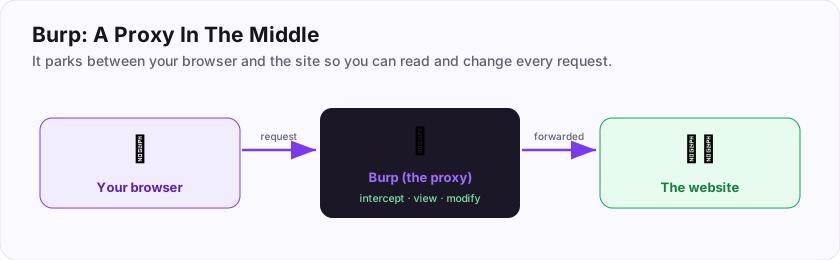
This is the tool professional web testers spend most of their day in. Everything you have studied — tampering with a hidden field, changing an id for IDOR, trying an injection payload — happens here, where you can see and change the raw request instead of fighting the browser's interface. Set up ZAP or Burp with the panel above, point a browser through it, and open a local target from the earlier offline labs.
2 Watch, then change
Two things to do, and they are the foundation of everything else.
Watch. With your browser routed through the proxy, use the app normally — log in, submit a form, click around. In the proxy's history you will see every request appear: the method, the path, the headers, the body. Find a form submission and read its request. You are now seeing exactly what the server sees, including fields the page tried to hide.
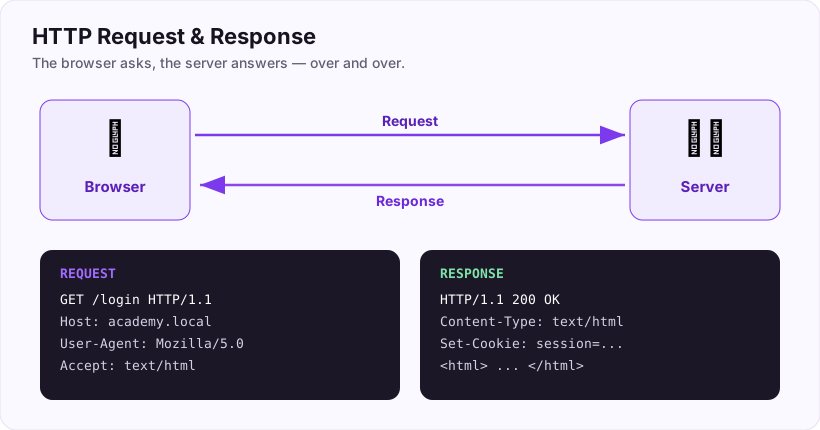
Change. Turn on interception (ZAP: the "break" toggle; Burp: Proxy → Intercept is on). Submit something in the browser. The proxy pauses the request and hands it to you *before* it reaches the server. Edit a value — change a quantity, a price field, an id — and let it continue. Watch how the server responds. This is the moment the lesson lands: the server receives whatever *you* decided to send, not what the page's form appeared to allow.
Do that a few times against your local target and the idea that "the browser enforces the rules" dissolves for good. The rules live on the server, and the proxy is how you prove it.
3 Confirm you did it
The keys check that you set the proxy up and understand where it sits. Because everything here runs on your own machine against your own target, the keys are about the tool and the concept rather than a captured flag.
Keep the proxy installed — it is the single most-used tool in web testing, and every later web exercise is easier once you are comfortable reading and editing requests in it.
Submit your keys
Keys are not case-sensitive. Each is worth points the first time you get it right.
Key 1What kind of tool sits between your browser and the server, letting you watch and modify HTTP requests before they are sent? (Two words — intercepting ___.)
+15 ptsShow a hint
ZAP and Burp are examples of it.A written solution is included with Pro, or appears here once you solve it.